<?xml version="1.0" encoding="utf-8"?>
<feed xmlns="http://www.w3.org/2005/Atom">
  <title>Keen&#39;s blog</title>
  
  
  <link href="/atom.xml" rel="self"/>
  
  <link href="https://zkeenly.github.io/"/>
  <updated>2021-07-04T14:06:48.069Z</updated>
  <id>https://zkeenly.github.io/</id>
  
  <author>
    <name>Keen</name>
    
  </author>
  
  <generator uri="http://hexo.io/">Hexo</generator>
  
  <entry>
    <title>Pixel4-解锁BL+ROOT+开启Motion-Sense</title>
    <link href="https://zkeenly.github.io/2021/07/04/Pixel4-%E8%A7%A3%E9%94%81BL+ROOT+%E5%BC%80%E5%90%AFMotion-Sense/"/>
    <id>https://zkeenly.github.io/2021/07/04/Pixel4-解锁BL+ROOT+开启Motion-Sense/</id>
    <published>2021-07-04T14:09:06.000Z</published>
    <updated>2021-07-04T14:06:48.069Z</updated>
    
    <content type="html"><![CDATA[<p>​    最近花1200入手了一台pixel4，到手后为了发现网络连接不断提示无法连接互联网，影响到部分程序的正常联网使用。提示无法连接网络的原因是由于Pixel默认使用google域名进行网络验证，而google由于众所周知的原因在国内无法顺利访问。其实这个问题用非ROOT的方法也可以解决。</p><h4 id="获取ROOT："><a href="#获取ROOT：" class="headerlink" title="获取ROOT："></a>获取ROOT：</h4><p>基本上我的操作步骤如第一篇文章所述，部分细节需要注意，不得不说，国外的论坛真的大多简单明了还不收费，国内很多都是一通抄袭,而且步驟非常不完整。本文其實大部分内容都是引用自其他内容,但是做了較爲完整的整合引用,以及細節説明.</p><ol><li><p>获取Boot Image镜像</p><p>如链接[3]，源文中未给出具体链接，这里一定要选择与手机一致的版本号，</p></li></ol><p>Settings &gt; About phone &gt; Build number.</p><p><img src="https://github.com/zkeenly/myblog/blob/master/source/images/2021-07-04-1.png?raw=true" alt="2021-07-04-1.png"></p><p>将文件解压，取出压缩包中的boot.img 文件，将文件拷贝到手机目录中（建议选择Download路径，不然后面找起来比较麻烦）</p><ol start="2"><li><p>Magisk Manager</p><p>面具的下载地址有很多了，如果能访问官网，我建议是直接从连接[4]中下载最新版本，安装完毕后选择install&gt; select and patch a file &gt; 选择boot.img文件，选择完毕之后，它将会给你一个magisk_patched.img 文件，记得把这个文件再拷贝回去电脑上留着。</p></li><li><p>打开OEM锁</p><p>去设置里将选择&gt;About phone. &gt;多次點擊Build number &gt; 返回上級頁面 ,選擇System &gt; Developer Options. &gt; 打開OEM unlocking</p></li><li><p>安裝ADB</p><p>ADB的安裝比較簡單,就是下載一個軟件包,免安裝,如[5].需要注意的是,一定要使用CMD打開命令行,不要使用powershell.</p></li><li><p>Unlock Bootloader</p><p>解鎖BL,需要關閉手機,然後按下電源按鍵以及音量減(注意是音量-).另外在此之前還需要安裝驅動.驱动程序文件如[6],安裝驅動方法如[7].</p><p>安装好驱动后,在手机打开USB调试模式</p><p>输入命令:</p><p>adb devices</p><p>可检查是否正常连接.</p><p>进入BL页面后,可以通过命令</p><p>fastboot devices</p><p>检查是否有正常连接.</p><p>进入BL页面之后,电脑连接手机,打开命令行输入</p><p>fastboot flashing unlock</p><p>即可解锁</p><p>解锁完毕之后,再将我们拷贝出来的magisk_patched.img 文件刷入手机</p><p>fastboot flash boot path/to/magisk_patched.img</p><p>其中path/to 为本地文件所在的路径.</p></li></ol><p>至此ROOT已经完毕，获取到ROOT之后，手机开机会有一个风险提示，忽略即可。</p><p>另外面具APP可能无法正常使用，需要重新安装。</p><h4 id="解锁Motion-Sense："><a href="#解锁Motion-Sense：" class="headerlink" title="解锁Motion Sense："></a>解锁Motion Sense：</h4><p>解锁Motion Sense需要安装EdXposed,如链接[8]，在Modules中搜索enableSoliOnPixel4,如[13],安装即可。</p><p>也可以通过命令行方式修改，如链接[11]，但是据说重启会失效？</p><figure class="highlight shell"><table><tr><td class="gutter"><pre><span class="line">1</span><br></pre></td><td class="code"><pre><span class="line">adb shell setprop pixel.oslo.allowed_override 1</span><br></pre></td></tr></table></figure><h4 id="修改本地网络检查方式："><a href="#修改本地网络检查方式：" class="headerlink" title="修改本地网络检查方式："></a>修改本地网络检查方式：</h4><p>参考链接[10],将网络检查的地址修改为google中国的地址</p><p>删除默认地址</p><p>adb shell settings delete global captive_portal_https_url<br>adb shell settings delete global captive_portal_http_url</p><p>改用新地址</p><p>adb shell settings put global captive_portal_http_url <a href="http://captive.v2ex.co/generate_204" target="_blank" rel="noopener">http://captive.v2ex.co/generate_204</a><br>adb shell settings put global captive_portal_https_url <a href="https://captive.v2ex.co/generate_204" target="_blank" rel="noopener">https://captive.v2ex.co/generate_204</a></p><p>ref:</p><p>[1]<a href="https://www.xda-developers.com/google-pixel-4-root-magisk/" target="_blank" rel="noopener">https://www.xda-developers.com/google-pixel-4-root-magisk/</a>  获取root</p><p>[2]<a href="https://blog.csdn.net/asdrt12589wto1/article/details/115965281" target="_blank" rel="noopener">https://blog.csdn.net/asdrt12589wto1/article/details/115965281</a> 网络受限</p><p>[3]<a href="https://developers.google.com/android/ota" target="_blank" rel="noopener">https://developers.google.com/android/ota</a> 镜像下载</p><p>[4]<a href="https://magiskmanager.co/apk/" target="_blank" rel="noopener">https://magiskmanager.co/apk/</a> 面具</p><p>[5]<a href="https://www.xda-developers.com/install-adb-windows-macos-linux/" target="_blank" rel="noopener">https://www.xda-developers.com/install-adb-windows-macos-linux/</a> 安裝ADB</p><p>[6]<a href="https://developer.android.com/studio/run/win-usb?hl=zh-cn" target="_blank" rel="noopener">https://developer.android.com/studio/run/win-usb?hl=zh-cn</a> 驱动</p><p>[7]<a href="https://blog.csdn.net/qz2014728/article/details/101760398" target="_blank" rel="noopener">https://blog.csdn.net/qz2014728/article/details/101760398</a> 安裝驅動</p><p>[8]<a href="https://edxposed.com/edxposed-install" target="_blank" rel="noopener">https://edxposed.com/edxposed-install</a> 安装Edxposed </p><p>[9]<a href="https://www.didgeridoohan.com/magisk/ManagerIssues" target="_blank" rel="noopener">https://www.didgeridoohan.com/magisk/ManagerIssues</a> 面具问题</p><p>[10]<a href="https://blog.csdn.net/asdrt12589wto1/article/details/115965281" target="_blank" rel="noopener">https://blog.csdn.net/asdrt12589wto1/article/details/115965281</a> 网络校验修正</p><p>[11]<a href="https://forum.xda-developers.com/t/magisk-tasker-release-motion-sense-soli-oslo-mod.3993877/#post-80729593" target="_blank" rel="noopener">https://forum.xda-developers.com/t/magisk-tasker-release-motion-sense-soli-oslo-mod.3993877/#post-80729593</a> 命令行启用motion sense</p><p>[12]<a href="https://www.xda-developers.com/enable-pixel-4-motion-sense-gestures/" target="_blank" rel="noopener">https://www.xda-developers.com/enable-pixel-4-motion-sense-gestures/</a> 启用motion sense</p><p>[13]<a href="https://forum.xda-developers.com/t/success-enable-soli-on-china.3994917/" target="_blank" rel="noopener">https://forum.xda-developers.com/t/success-enable-soli-on-china.3994917/</a> enableSoliOnPixel4</p>]]></content>
    
    <summary type="html">


        &lt;p&gt;​    最近花1200入手了一台pixel4，到手后为了发现网络连接不断提示无法连接互联网，影响到部分程序的正常联网使用。提示无法连接网络的原因是由于Pixel默认使用google域名进行网络验证，而google由于众所周知的原因在国内无法顺利访问。其实这个问题用非ROO
      
    
    </summary>
    
      <category term="Android" scheme="https://zkeenly.github.io/categories/Android/"/>
    
    
      <category term="android" scheme="https://zkeenly.github.io/tags/android/"/>
    
      <category term="pixel" scheme="https://zkeenly.github.io/tags/pixel/"/>
    
      <category term="root" scheme="https://zkeenly.github.io/tags/root/"/>
    
      <category term="motion sense" scheme="https://zkeenly.github.io/tags/motion-sense/"/>
    
  </entry>
  
  <entry>
    <title>Python中self参数的解释</title>
    <link href="https://zkeenly.github.io/2019/03/22/python%E4%B8%ADself%E5%8F%82%E6%95%B0%E7%9A%84%E8%A7%A3%E9%87%8A/"/>
    <id>https://zkeenly.github.io/2019/03/22/python中self参数的解释/</id>
    <published>2019-03-22T07:26:09.000Z</published>
    <updated>2019-03-22T07:35:01.230Z</updated>
    
    <content type="html"><![CDATA[<p>这篇文章中我们将会讨论self 变量在python 中的应用。很多初学者都对python 中self的使用方法表示困惑。如果你也是这样，那么你应该读一下这篇文章。</p><p>一个简单的类：</p><figure class="highlight python"><table><tr><td class="gutter"><pre><span class="line">1</span><br><span class="line">2</span><br><span class="line">3</span><br><span class="line">4</span><br><span class="line">5</span><br></pre></td><td class="code"><pre><span class="line"><span class="class"><span class="keyword">class</span> <span class="title">Restaturant</span><span class="params">(object)</span>:</span></span><br><span class="line">bankrupt = <span class="keyword">False</span></span><br><span class="line">    <span class="function"><span class="keyword">def</span> <span class="title">open_branch</span><span class="params">(self)</span>:</span></span><br><span class="line">        <span class="keyword">if</span> <span class="keyword">not</span> self.bankrupt:</span><br><span class="line">            print(<span class="string">"branch opened"</span>)</span><br></pre></td></tr></table></figure><p>首先我们从非专业的角度解释这段代码。首先我们创建一个类 Restaurant。然后我们生命它的一个属性 bankrupt 为 false。然后我们定义一个函数open_branch ，仅当 bankrupt 为 false 的时候触发打印功能，这意味着Restautant 还有钱。</p><p>创建一个 resturant：</p><p>现在，我们来创建一个Restaurant类的对象，让我们创建一个resturant：</p><figure class="highlight python"><table><tr><td class="gutter"><pre><span class="line">1</span><br></pre></td><td class="code"><pre><span class="line">x = Restaurant()</span><br></pre></td></tr></table></figure><p>现在 x 是一个Restaurant，并且具有bankrupt 属性以及一个open_branch 函数。现在我们可以通过以下代码访问这个bankrupt属性：</p><figure class="highlight python"><table><tr><td class="gutter"><pre><span class="line">1</span><br></pre></td><td class="code"><pre><span class="line">x.bankrupt</span><br></pre></td></tr></table></figure><p>以下命令具有相同的效果：</p><figure class="highlight python"><table><tr><td class="gutter"><pre><span class="line">1</span><br></pre></td><td class="code"><pre><span class="line">Restaurant().bankrupt</span><br></pre></td></tr></table></figure><p>现在你可以看到self 指的是绑定的变量或者对象。在第一个例子中，由于我们已经将Restaurant 类赋值到x，所以self 就是x，然而第二个例子中就是<code>Restaurant()</code> 。现在我们有另一个Restaurant y，self 将会自动访问y的bankrupt而不是x的。例如：</p><figure class="highlight python"><table><tr><td class="gutter"><pre><span class="line">1</span><br><span class="line">2</span><br><span class="line">3</span><br><span class="line">4</span><br><span class="line">5</span><br><span class="line">6</span><br><span class="line">7</span><br><span class="line">8</span><br><span class="line">9</span><br><span class="line">10</span><br><span class="line">11</span><br><span class="line">12</span><br><span class="line">13</span><br><span class="line">14</span><br><span class="line">15</span><br><span class="line">16</span><br><span class="line">17</span><br></pre></td><td class="code"><pre><span class="line">&gt;&gt; x = Restaurant()</span><br><span class="line">&gt;&gt; x.bankrupt</span><br><span class="line">&gt;&gt; x.open_branch()</span><br><span class="line"><span class="keyword">False</span></span><br><span class="line">branch opened</span><br><span class="line"></span><br><span class="line">&gt;&gt; y = Restaurant()</span><br><span class="line">&gt;&gt; y.bankrupt = <span class="keyword">True</span></span><br><span class="line">&gt;&gt; y.bankrupt</span><br><span class="line">&gt;&gt; y.open_branch()</span><br><span class="line"><span class="keyword">True</span></span><br><span class="line"></span><br><span class="line"></span><br><span class="line">&gt;&gt; x.bankrupt</span><br><span class="line">&gt;&gt; x.open_branch()</span><br><span class="line"><span class="keyword">False</span></span><br><span class="line">branch opened</span><br></pre></td></tr></table></figure><p><strong>在上面的例子中，当修改了x.bankrupt 之后， x.open_branch()也无法正常打印。简单的说，self就是类自身，通过self.xxx可以引用当前方法所在类的属性和方法。而在使用某个方法的时候并不需要为self参数传递值。</strong></p><p>每一个类的第一个方法（包括init），总是一个引用当前类的实例。更通俗的说，这个参数总是被成为self。在init 方法中，self 指的是新创建的对象；在其他类的方法中，它代表实例的方法被调用。下面的例子有相同的效果：</p><figure class="highlight python"><table><tr><td class="gutter"><pre><span class="line">1</span><br><span class="line">2</span><br><span class="line">3</span><br><span class="line">4</span><br><span class="line">5</span><br></pre></td><td class="code"><pre><span class="line"><span class="class"><span class="keyword">class</span> <span class="title">Restaurant</span><span class="params">(object)</span>:</span></span><br><span class="line">    bankrupt = <span class="keyword">False</span></span><br><span class="line">    <span class="function"><span class="keyword">def</span> <span class="title">open_branch</span><span class="params">(this)</span>:</span></span><br><span class="line">        <span class="keyword">if</span> <span class="keyword">not</span> this.bankrupt:</span><br><span class="line">            print(<span class="string">"branch opened"</span>)</span><br></pre></td></tr></table></figure><p>然而 self 在python 中并不是一个保留关键字，仅仅是一个普遍共识。许多人说为什么我们必须要写self？为什么不能像java一样自动设置？一些人也提交了PEP（改进建议）并建议移除这个self的声明。然而 GuidoVan Rossum 写了一个<a href="http://neopythonic.blogspot.com/2008/10/why-explicit-self-has-to-stay.html" target="_blank" rel="noopener">bolg</a>解释为什么不得不声明self。</p><p>引用：</p><p>[1] <a href="https://pythontips.com/2013/08/07/the-self-variable-in-python-explained/" target="_blank" rel="noopener">https://pythontips.com/2013/08/07/the-self-variable-in-python-explained/</a><br>[2] <a href="http://neopythonic.blogspot.com/2008/10/why-explicit-self-has-to-stay.html" target="_blank" rel="noopener">http://neopythonic.blogspot.com/2008/10/why-explicit-self-has-to-stay.html</a></p>]]></content>
    
    <summary type="html">


        &lt;p&gt;这篇文章中我们将会讨论self 变量在python 中的应用。很多初学者都对python 中self的使用方法表示困惑。如果你也是这样，那么你应该读一下这篇文章。&lt;/p&gt;
&lt;p&gt;一个简单的类：&lt;/p&gt;
&lt;figure class=&quot;highlight python&quot;&gt;&lt;ta
      
    
    </summary>
    
      <category term="python" scheme="https://zkeenly.github.io/categories/python/"/>
    
    
      <category term="python" scheme="https://zkeenly.github.io/tags/python/"/>
    
  </entry>
  
  <entry>
    <title>[ACM/算法]算法硬币问题</title>
    <link href="https://zkeenly.github.io/2019/03/09/ACM-%E7%AE%97%E6%B3%95-%E7%A1%AC%E5%B8%81%E9%97%AE%E9%A2%98/"/>
    <id>https://zkeenly.github.io/2019/03/09/ACM-算法-硬币问题/</id>
    <published>2019-03-09T03:23:25.000Z</published>
    <updated>2019-03-09T07:27:53.298Z</updated>
    
    <content type="html"><![CDATA[<p>动态规划问题之一，硬币问题。</p><h3 id="问题描述"><a href="#问题描述" class="headerlink" title="问题描述"></a>问题描述</h3><p>假设有 1 元，3 元，5 元的硬币若干（无限），现在需要凑出 11 元，问如何组合才能使硬币的数量最少？</p><p>输入硬币种类数量为number，需要凑出的金钱为money</p><p>接下来number列，输入所有的硬币种类money_list[]</p><h3 id="问题分析"><a href="#问题分析" class="headerlink" title="问题分析"></a>问题分析</h3><p>我们从凑出1元开始，依次递进，最终得到凑出11元的结果。</p><ol><li><p>假设res_list[i] 为凑出i元所需要的硬币数量</p></li><li><p>我们生成状态转移方程：</p><p>res_list[i] =min<sub>j=1…number</sub>[res_list[i-coin<sub>j</sub>] + 1)]，其中coin<sub>j</sub>为所有硬币种类硬币序列</p><p>即 当前凑出i的 最优解数量是凑出 i-coin<sub>j</sub> 的最优解 +1，且+1所代表的硬币是coin<sub>j</sub>。</p></li><li><p>res_list[0] 必定是0，res_list[1] = min<sub>j = 1… number</sub>[res_list[1-coin<sub>j</sub>] +1]</p></li><li><p>每次得到res_list[i]的值之后，都将当前的res_order[i-coin<sub>j</sub>]和coin<sub>j</sub>保存到res_order[i]中，作为硬币序列。</p></li></ol><h3 id="算法代码"><a href="#算法代码" class="headerlink" title="算法代码"></a>算法代码</h3><figure class="highlight python"><table><tr><td class="gutter"><pre><span class="line">1</span><br><span class="line">2</span><br><span class="line">3</span><br><span class="line">4</span><br><span class="line">5</span><br><span class="line">6</span><br><span class="line">7</span><br><span class="line">8</span><br><span class="line">9</span><br><span class="line">10</span><br><span class="line">11</span><br><span class="line">12</span><br><span class="line">13</span><br><span class="line">14</span><br><span class="line">15</span><br><span class="line">16</span><br><span class="line">17</span><br><span class="line">18</span><br><span class="line">19</span><br><span class="line">20</span><br><span class="line">21</span><br><span class="line">22</span><br><span class="line">23</span><br><span class="line">24</span><br><span class="line">25</span><br><span class="line">26</span><br><span class="line">27</span><br><span class="line">28</span><br><span class="line">29</span><br><span class="line">30</span><br><span class="line">31</span><br><span class="line">32</span><br></pre></td><td class="code"><pre><span class="line"><span class="comment"># 输入硬币种类数量和需要凑的金钱</span></span><br><span class="line">number, money = input().split(<span class="string">' '</span>)</span><br><span class="line"><span class="comment"># 金钱种类列表，存放所有类型的硬币</span></span><br><span class="line">money_lists = []</span><br><span class="line"><span class="comment"># 输入所有硬币种类的面值</span></span><br><span class="line"><span class="keyword">for</span> i <span class="keyword">in</span> range(int(number)):</span><br><span class="line">    money_lists.append(int(input()))</span><br><span class="line"></span><br><span class="line">res_list = [<span class="number">0</span> <span class="keyword">for</span> i <span class="keyword">in</span> range(int(money)+<span class="number">1</span>)]  <span class="comment"># 保存结果列表，每个数组都是该情况最小的种类数量</span></span><br><span class="line">res_order = [[<span class="number">0</span> <span class="keyword">for</span> j <span class="keyword">in</span> range(<span class="number">0</span>)] <span class="keyword">for</span> i <span class="keyword">in</span> range(int(money)+<span class="number">1</span>)]  <span class="comment"># 保存结果序列，其中每一个数组都保存了一个该情况的最小硬币序列</span></span><br><span class="line"><span class="keyword">for</span> i <span class="keyword">in</span> range(<span class="number">1</span>, int(money)+<span class="number">1</span>):  <span class="comment"># 遍历所需要凑的金额</span></span><br><span class="line">    current_coin = <span class="number">-1</span></span><br><span class="line">    min_res = <span class="number">-1</span></span><br><span class="line">    <span class="keyword">for</span> j <span class="keyword">in</span> money_lists:  <span class="comment"># 遍历硬币面值</span></span><br><span class="line">        <span class="keyword">if</span> i &gt;= j:  <span class="comment"># 确定不会超出界限，即当前需要的硬币总额不小于当前硬币面额</span></span><br><span class="line">            <span class="keyword">if</span> min_res == <span class="number">-1</span>:</span><br><span class="line">                min_res = res_list[i-j]+<span class="number">1</span></span><br><span class="line">                current_coin = j</span><br><span class="line">            <span class="keyword">elif</span> res_list[i-j]+<span class="number">1</span> &lt; min_res:</span><br><span class="line">                min_res = res_list[i-j]+<span class="number">1</span></span><br><span class="line">                current_coin = j</span><br><span class="line">    res_list[i] = min_res  <span class="comment"># 将最小的种类组合个数复制给当前res_lists</span></span><br><span class="line">    <span class="keyword">for</span> k <span class="keyword">in</span> res_order[i-current_coin]:  <span class="comment"># 保存当前硬币序列到列表order。</span></span><br><span class="line">        <span class="comment"># print(res_order[i-current_coin])</span></span><br><span class="line">        <span class="comment"># print(i)</span></span><br><span class="line">        <span class="keyword">if</span> k != <span class="number">0</span>:</span><br><span class="line">            res_order[i].append(k)</span><br><span class="line">    <span class="keyword">if</span> current_coin != <span class="number">0</span>:</span><br><span class="line">        res_order[i].append(current_coin)</span><br><span class="line"></span><br><span class="line"><span class="comment"># print(res_list)</span></span><br><span class="line">print(res_order)</span><br></pre></td></tr></table></figure><p>算法代码点击 <a href="https://github.com/zkeenly/articles/blob/master/CoinsProblems.py" target="_blank" rel="noopener">这里</a></p><h4 id="引用："><a href="#引用：" class="headerlink" title="引用："></a>引用：</h4><p><a href="https://www.cnblogs.com/snowInPluto/p/5992846.html" target="_blank" rel="noopener">https://www.cnblogs.com/snowInPluto/p/5992846.html</a></p>]]></content>
    
    <summary type="html">


        &lt;p&gt;动态规划问题之一，硬币问题。&lt;/p&gt;
&lt;h3 id=&quot;问题描述&quot;&gt;&lt;a href=&quot;#问题描述&quot; class=&quot;headerlink&quot; title=&quot;问题描述&quot;&gt;&lt;/a&gt;问题描述&lt;/h3&gt;&lt;p&gt;假设有 1 元，3 元，5 元的硬币若干（无限），现在需要凑出 11 元，问如何
      
    
    </summary>
    
      <category term="ACM/算法" scheme="https://zkeenly.github.io/categories/ACM-%E7%AE%97%E6%B3%95/"/>
    
    
      <category term="算法" scheme="https://zkeenly.github.io/tags/%E7%AE%97%E6%B3%95/"/>
    
  </entry>
  
  <entry>
    <title>[ACM/算法]01背包问题详解+扩展</title>
    <link href="https://zkeenly.github.io/2019/03/08/ACM-%E7%AE%97%E6%B3%95-01%E8%83%8C%E5%8C%85%E9%97%AE%E9%A2%98%E8%AF%A6%E8%A7%A3-%E6%89%A9%E5%B1%95/"/>
    <id>https://zkeenly.github.io/2019/03/08/ACM-算法-01背包问题详解-扩展/</id>
    <published>2019-03-08T07:51:01.000Z</published>
    <updated>2019-03-09T07:27:25.078Z</updated>
    
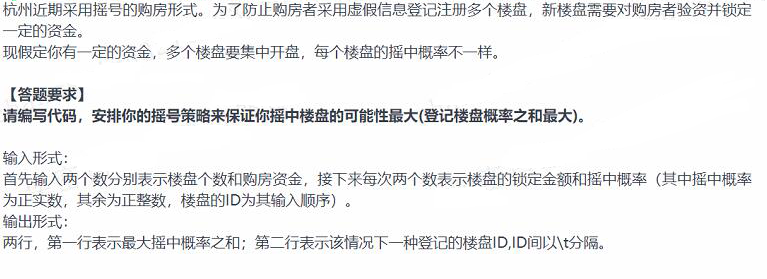
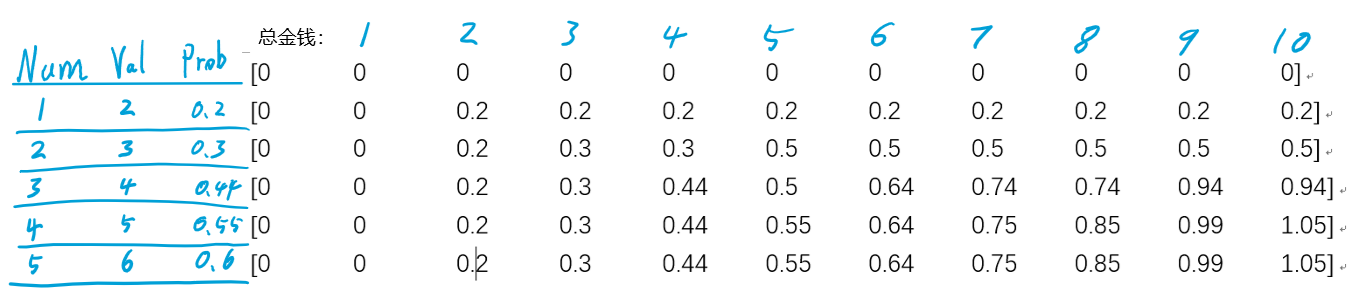
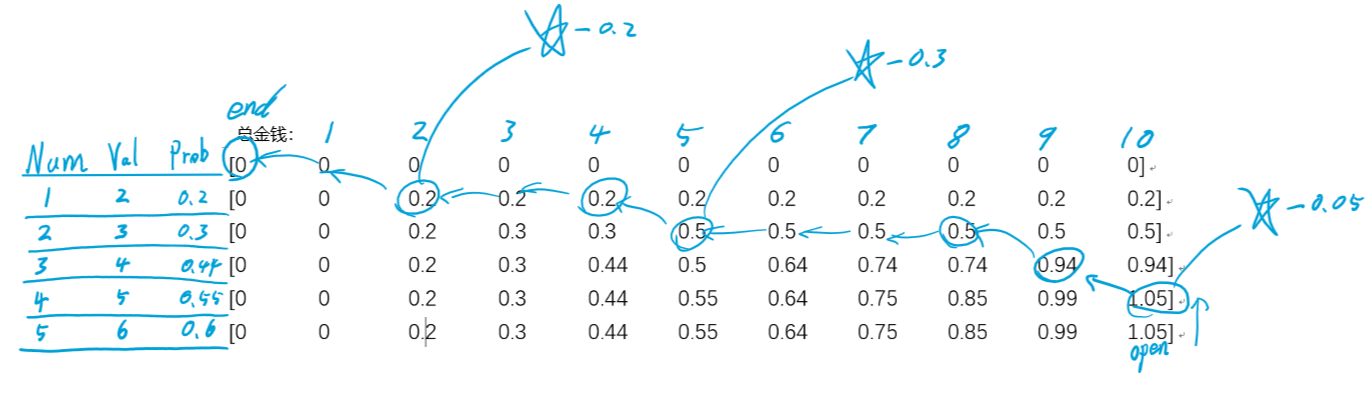
    <content type="html"><![CDATA[<p>01背包问题作为著名的动态规划问题之一，在算法学习中的意义不言而喻。</p><p>最近刷到一道题，在01背包问题中有稍微改变。</p><p><img src="https://www.zkeenly.com/images/2019-03-08-1.png" alt="BeiBaoQuestion"></p><p>题中不仅要求输出最大概率之和，还要求输出楼盘ID。</p><h3 id="动态规划问题"><a href="#动态规划问题" class="headerlink" title="动态规划问题"></a>动态规划问题</h3><p>例如输入序列为：</p><blockquote><p>5 10<br>2 0.2<br>3 0.3<br>4 0.44<br>5 0.55<br>6 0.6</p></blockquote><h4 id="贪心算法："><a href="#贪心算法：" class="headerlink" title="贪心算法："></a>贪心算法：</h4><p>第一种解法是贪心算法</p><ol><li>将所有楼盘序列计算出单位概率。</li><li>按照单位概率将序列排序。</li><li>依次从高概率遍历到低概率，从而得到局部最优解。</li></ol><p>算法代码：</p><figure class="highlight python"><table><tr><td class="gutter"><pre><span class="line">1</span><br><span class="line">2</span><br><span class="line">3</span><br><span class="line">4</span><br><span class="line">5</span><br><span class="line">6</span><br><span class="line">7</span><br><span class="line">8</span><br><span class="line">9</span><br><span class="line">10</span><br><span class="line">11</span><br><span class="line">12</span><br><span class="line">13</span><br><span class="line">14</span><br><span class="line">15</span><br><span class="line">16</span><br><span class="line">17</span><br><span class="line">18</span><br><span class="line">19</span><br><span class="line">20</span><br><span class="line">21</span><br><span class="line">22</span><br><span class="line">23</span><br></pre></td><td class="code"><pre><span class="line"><span class="function"><span class="keyword">def</span> <span class="title">greedy</span><span class="params">()</span>:</span></span><br><span class="line">    number, fund = input().split(<span class="string">' '</span>)</span><br><span class="line">    fund = int(fund)</span><br><span class="line">    array = []</span><br><span class="line">    max_prob = []</span><br><span class="line">    max_value = <span class="number">0</span></span><br><span class="line">    <span class="keyword">for</span> i <span class="keyword">in</span> range(int(number)):  <span class="comment"># 输入锁定金额和概率</span></span><br><span class="line">        value, prob = input().split(<span class="string">' '</span>)</span><br><span class="line">        current_id = i+<span class="number">1</span></span><br><span class="line">        array.append([current_id, int(value), float(prob), float(prob)/float(value)])</span><br><span class="line">    print(array)</span><br><span class="line">    <span class="comment"># 第四位排序</span></span><br><span class="line">    array.sort(key=take_four, reverse=<span class="keyword">True</span>)</span><br><span class="line">    print(array)</span><br><span class="line">    <span class="keyword">for</span> i <span class="keyword">in</span> array:  <span class="comment"># 选中最佳可能的资金</span></span><br><span class="line">        max_value += i[<span class="number">1</span>]</span><br><span class="line">        <span class="keyword">if</span> max_value &lt; fund:</span><br><span class="line">            max_prob.append([i[<span class="number">0</span>], i[<span class="number">2</span>]])</span><br><span class="line">    print(<span class="string">'max_prob:'</span>, max_prob)</span><br><span class="line">    max_prob_value = <span class="number">0</span></span><br><span class="line">    <span class="keyword">for</span> i <span class="keyword">in</span> max_prob:</span><br><span class="line">        max_prob_value = i[<span class="number">1</span>] + max_prob_value</span><br><span class="line">    print(max_prob_value, [x[<span class="number">0</span>] <span class="keyword">for</span> x <span class="keyword">in</span> max_prob])</span><br></pre></td></tr></table></figure><p>我们可以得到结果</p><p><code>0.99 [4, 3]</code></p><p>显然这不是我们想要的结果，因为最优解应该为1，2，4 = 1.05才对。</p><h4 id="动态规划"><a href="#动态规划" class="headerlink" title="动态规划"></a>动态规划</h4><h5 id="寻找最大概率值"><a href="#寻找最大概率值" class="headerlink" title="寻找最大概率值"></a>寻找最大概率值</h5><p>使用动态规划的方法解决该问题需要对问题建立转移方程：</p><ol><li><p>输入楼盘数量为number，总资金为fund</p></li><li><p>输入楼盘的数据raw_data.</p></li><li><p>定义子问题P(i, v)为在前i个楼盘中挑选总价值不超过v的楼盘，并且每个楼盘只能选择一次，使得最终抽中的总概率最大。我们此时的最优解记作max_prob(i, w)，其中1&lt;=i&lt;=number,1&lt;=w&lt;=fund。</p></li><li><p>当我们考虑第i个楼盘的时候：</p><p>如果不选择，则总资金容量不变，改为问题P(i-1, w)</p><p>如果选择这个楼盘，则总资金剩余容量变小，改问题为P(i-1, w-wi)</p></li><li><p>最优解的问题就是比较3中两个方案哪一个是最佳的：</p><p>max_prob(i,w) = max{max_prob(i-1,w),max_prob(i-1,w-wi)+valuei}</p></li></ol><p>例如输入序列为：</p><blockquote><p>5 10<br>2 0.2<br>3 0.3<br>4 0.44<br>5 0.55<br>6 0.6</p></blockquote><blockquote><p>假设我们一共有10W金钱，楼盘价值分别为2，3，4，5，6。楼盘概率分别为0.2，0.3，0.44，0.55，0.6。</p></blockquote><p>那么我们通过转移方程可以推算出以下表格max_prob：</p><p><img src="https://www.zkeenly.com/images/2019-03-08-2.png" alt="1552028354656"></p><p>推算过程:</p><ol><li><p>建立一个表格，大小为number×fund。</p></li><li><p>逐层遍历，按列遍历。</p><ol><li><p>当资金为1的时候，没有任何房产可以购买。</p></li><li><p>当资金为2的时候，可以购买房产1。</p></li><li><p>当资金为3的时候，可以购买房产1，但是当遍历到（2，3）的时候，对比</p><p>max{max_prob(i-1,w),max_prob(i-1,w-wi)+valuei}</p><p>其中max_prob(i-1,w) 代表i-1行w列。</p><p>其中max_prob(i-1,w)为0.2，max_prob(i-1,w-wi)+valuei 为0.2-0.2 + 0.3 = 0.3</p></li><li><p>经过逐次的遍历，得到最终整个矩阵数据。</p></li></ol></li></ol><p>算法代码：</p><figure class="highlight python"><table><tr><td class="gutter"><pre><span class="line">1</span><br><span class="line">2</span><br><span class="line">3</span><br><span class="line">4</span><br><span class="line">5</span><br><span class="line">6</span><br><span class="line">7</span><br><span class="line">8</span><br><span class="line">9</span><br><span class="line">10</span><br><span class="line">11</span><br><span class="line">12</span><br><span class="line">13</span><br><span class="line">14</span><br><span class="line">15</span><br><span class="line">16</span><br><span class="line">17</span><br><span class="line">18</span><br><span class="line">19</span><br><span class="line">20</span><br><span class="line">21</span><br><span class="line">22</span><br><span class="line">23</span><br><span class="line">24</span><br><span class="line">25</span><br><span class="line">26</span><br></pre></td><td class="code"><pre><span class="line"><span class="function"><span class="keyword">def</span> <span class="title">dynasty</span><span class="params">()</span>:</span></span><br><span class="line">    <span class="comment"># ----------------输入数据----------------------</span></span><br><span class="line">    number, fund = input().split(<span class="string">' '</span>)</span><br><span class="line">    fund = int(fund)</span><br><span class="line">    number = int(number)</span><br><span class="line">    max_prob = [[<span class="number">0</span> <span class="keyword">for</span> col <span class="keyword">in</span> range(fund+<span class="number">1</span>)] <span class="keyword">for</span> row <span class="keyword">in</span> range(number+<span class="number">1</span>)]</span><br><span class="line">    raw_data = []</span><br><span class="line">    <span class="keyword">for</span> i <span class="keyword">in</span> range(int(number)):  <span class="comment"># 输入锁定金额和概率</span></span><br><span class="line">        value, prob = input().split(<span class="string">' '</span>)</span><br><span class="line">        current_id = i+<span class="number">1</span></span><br><span class="line">        raw_data.append([current_id, int(value), float(prob), float(prob)/float(value)])</span><br><span class="line">    <span class="comment"># ---------------计算概率分布矩阵-------------------</span></span><br><span class="line">    all_max = <span class="number">0</span></span><br><span class="line">    <span class="keyword">for</span> i <span class="keyword">in</span> range(<span class="number">1</span>, number+<span class="number">1</span>):  <span class="comment"># 遍历所有的房价,number为房产个数</span></span><br><span class="line">        <span class="keyword">for</span> j <span class="keyword">in</span> range(<span class="number">1</span>, fund+<span class="number">1</span>):  <span class="comment"># 遍历所有总金额,</span></span><br><span class="line">            <span class="comment"># print(i, j, raw_data[i-1][1])</span></span><br><span class="line">            <span class="keyword">if</span> j &lt; raw_data[i<span class="number">-1</span>][<span class="number">1</span>]:  <span class="comment"># 假定的总金额小于当前房产的价格</span></span><br><span class="line">                max_prob[i][j] = max_prob[i<span class="number">-1</span>][j]  <span class="comment"># 概率等于之前的</span></span><br><span class="line">            <span class="keyword">else</span>:</span><br><span class="line">                max_prob[i][j] = max(max_prob[i<span class="number">-1</span>][j], (max_prob[i<span class="number">-1</span>][j-raw_data[i<span class="number">-1</span>][<span class="number">1</span>]] + raw_data[i<span class="number">-1</span>][<span class="number">2</span>]))</span><br><span class="line">                <span class="keyword">if</span> max_prob[i][j] &gt; all_max:  <span class="comment"># 记录概率最大值</span></span><br><span class="line">                    all_max = max_prob[i][j]</span><br><span class="line">   </span><br><span class="line"><span class="comment"># ----------------打印概率分布矩阵---------------</span></span><br><span class="line">    print(<span class="string">'概率分布矩阵:\n'</span>, max_prob)</span><br><span class="line">    print(<span class="string">'all_max_prob:'</span>, all_max)</span><br></pre></td></tr></table></figure><h5 id="计算楼盘的序列"><a href="#计算楼盘的序列" class="headerlink" title="计算楼盘的序列"></a>计算楼盘的序列</h5><ol><li><p>定义指针（i,j）倒序遍历表格</p></li><li><p>从末尾开始遍历,寻找按顺序排列第一次出现<code>all_max</code>节点,将<code>all_max</code>修改为<code>all_max-raw_data[i][prob]</code></p></li><li><p>当找到第一个星号1.05后移动指针位置到（i-1,j-1）,检测当前值是否为第一次出现的<code>all_max</code>,如果是，标记为星，并重复2步骤，直到遍历到（0，0）</p></li><li><p>输出所有标记星所在的行即为楼盘序列。</p><p><img src="https://www.zkeenly.com/images/2019-03-08-3.png" alt="1552030438642"></p></li></ol><p>算法代码：</p><figure class="highlight python"><table><tr><td class="gutter"><pre><span class="line">1</span><br><span class="line">2</span><br><span class="line">3</span><br><span class="line">4</span><br><span class="line">5</span><br><span class="line">6</span><br><span class="line">7</span><br><span class="line">8</span><br><span class="line">9</span><br><span class="line">10</span><br><span class="line">11</span><br><span class="line">12</span><br><span class="line">13</span><br><span class="line">14</span><br><span class="line">15</span><br><span class="line">16</span><br><span class="line">17</span><br><span class="line">18</span><br><span class="line">19</span><br><span class="line">20</span><br><span class="line">21</span><br><span class="line">22</span><br><span class="line">23</span><br><span class="line">24</span><br><span class="line">25</span><br><span class="line">26</span><br><span class="line">27</span><br><span class="line">28</span><br><span class="line">29</span><br><span class="line">30</span><br></pre></td><td class="code"><pre><span class="line"><span class="comment"># ----------------从表中推出楼盘列表--------------</span></span><br><span class="line">id_list = []</span><br><span class="line"><span class="comment"># id_list.append(max_id)</span></span><br><span class="line"><span class="comment"># 反向查找关键节点</span></span><br><span class="line">j = fund  <span class="comment"># 定义列位置</span></span><br><span class="line">i = number  <span class="comment"># 定义行位置</span></span><br><span class="line"><span class="keyword">while</span> i != <span class="number">0</span> <span class="keyword">and</span> j != <span class="number">0</span>:  <span class="comment"># 从max_prob表右下位置开始，逆序遍历</span></span><br><span class="line">    <span class="comment"># print('all_max:', all_max)</span></span><br><span class="line">    print(<span class="string">'当前遍历的节点i,j,prob:'</span>, i, j, max_prob[i][j])</span><br><span class="line">    <span class="comment"># print('value:', int(max_prob[i][j]))</span></span><br><span class="line">    <span class="comment"># print('value_(i,j-1):', int(max_prob[i][j-1]))</span></span><br><span class="line">    <span class="comment"># 如果同行上一列的的概率值仍然为最大，则切换到上一列</span></span><br><span class="line">    <span class="keyword">if</span> max_prob[i][j<span class="number">-1</span>] == all_max:</span><br><span class="line">        <span class="comment"># print('j = j-1')</span></span><br><span class="line">        j = j<span class="number">-1</span></span><br><span class="line">    <span class="comment"># 如果同列上一行的的概率值仍然为最大，则切换到上一行</span></span><br><span class="line">    <span class="keyword">elif</span> max_prob[i - <span class="number">1</span>][j] == all_max:</span><br><span class="line">        <span class="comment"># print('i = i-1')</span></span><br><span class="line">        i = i<span class="number">-1</span></span><br><span class="line">    <span class="comment"># 处于拐点，可能是一个关键点。</span></span><br><span class="line">    <span class="keyword">else</span>:</span><br><span class="line">        <span class="comment"># print('test', int(max_prob[i][j]), int(all_max - raw_data[i-1][2]))</span></span><br><span class="line">        <span class="comment"># 如果当前概率等于最大的概率，则是关键点</span></span><br><span class="line">        <span class="keyword">if</span> max_prob[i][j] == all_max:</span><br><span class="line">            id_list.append(raw_data[i<span class="number">-1</span>][<span class="number">0</span>])  <span class="comment"># 保存当前楼盘的id</span></span><br><span class="line">            all_max = all_max - raw_data[i<span class="number">-1</span>][<span class="number">2</span>]  <span class="comment"># 转换当前最大概率，寻找下一个关键节点</span></span><br><span class="line">            print(<span class="string">'----当前楼盘是关键点之一：'</span>, i, <span class="string">'下一个节点prob为：'</span>, all_max)</span><br><span class="line">        i = i<span class="number">-1</span></span><br><span class="line">        j = j<span class="number">-1</span></span><br><span class="line">print(id_list)</span><br></pre></td></tr></table></figure><p>算法源码点击 <a href="https://github.com/zkeenly/articles/blob/master/KnapsackProblem.py" target="_blank" rel="noopener">这里</a></p><p>引用：</p><p><a href="https://blog.csdn.net/huanghaocs/article/details/77920358" target="_blank" rel="noopener">https://blog.csdn.net/huanghaocs/article/details/77920358</a></p><p><a href="https://zhuanlan.zhihu.com/p/30959069" target="_blank" rel="noopener">https://zhuanlan.zhihu.com/p/30959069</a></p>]]></content>
    
    <summary type="html">


        &lt;p&gt;01背包问题作为著名的动态规划问题之一，在算法学习中的意义不言而喻。&lt;/p&gt;
&lt;p&gt;最近刷到一道题，在01背包问题中有稍微改变。&lt;/p&gt;
&lt;p&gt;&lt;img src=&quot;https://www.zkeenly.com/images/2019-03-08-1.png&quot; alt=&quot;B
      
    
    </summary>
    
      <category term="ACM/算法" scheme="https://zkeenly.github.io/categories/ACM-%E7%AE%97%E6%B3%95/"/>
    
    
      <category term="算法" scheme="https://zkeenly.github.io/tags/%E7%AE%97%E6%B3%95/"/>
    
  </entry>
  
  <entry>
    <title>论如何玩好QQ游戏-打手掌</title>
    <link href="https://zkeenly.github.io/2019/02/24/%E8%AE%BA%E5%A6%82%E4%BD%95%E7%8E%A9%E5%A5%BDQQ%E6%B8%B8%E6%88%8F-%E6%89%93%E6%89%8B%E6%8E%8C/"/>
    <id>https://zkeenly.github.io/2019/02/24/论如何玩好QQ游戏-打手掌/</id>
    <published>2019-02-24T10:10:00.000Z</published>
    <updated>2019-03-02T07:42:08.274Z</updated>
    
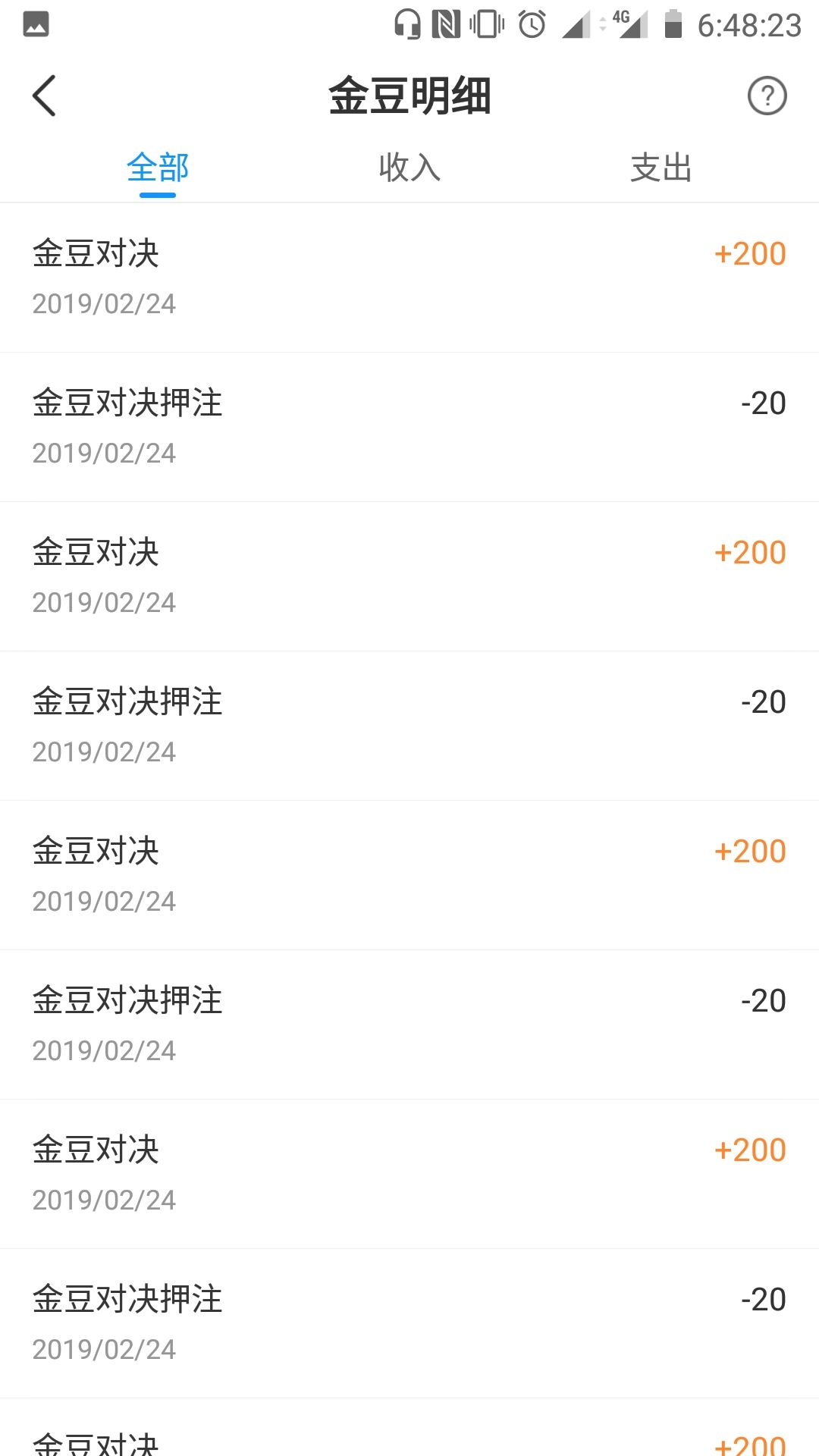
    <content type="html"><![CDATA[<p><img src="https://zkeenly.com/images/2019-02-24-1.jpg" width="50%"></p><p>说到QQ游戏，给人的感觉像是回到了N年前一样,现在连小学生都不会玩了吧。</p><p>有一天发现QQ游戏有一个栏目-小比赛，使用小比赛中赢得的金豆可以兑换腾讯服务以及腾讯视频VIP，于是就选择了游戏“打手掌”试一试，玩了几局之后发现一个很容易获胜的规律分享给大家。</p><p><img src="https://zkeenly.com/images/2019-02-24-3.jpg" width="50%"></p><h4 id="当对方打你的时候如何闪避"><a href="#当对方打你的时候如何闪避" class="headerlink" title="当对方打你的时候如何闪避"></a>当对方打你的时候如何闪避</h4><p><img src="https://zkeenly.com/images/2019-02-24-7.gif" alt=""></p><p>一个小技巧就是手持续按着“闪避”按钮，一旦看到对方伸手来打，就立即松开按钮。这样做相比较看到了再去点击闪避要更容易躲过打击。</p><h4 id="如何高效的打中对方"><a href="#如何高效的打中对方" class="headerlink" title="如何高效的打中对方"></a>如何高效的打中对方</h4><p><img src="https://zkeenly.com/images/2019-02-24-5.gif" alt=""></p><p>当开始打击对方的时候：</p><ol><li>将右手指按在攻击按键上不要松开（注意手要稳一些，不要在按键上滑动，否则容易失去触点）。</li><li>持续点击假动作并观察对方动态。</li><li>一旦发现对方有收回迹象，立即松开攻击按键，手掌会迅速打击过去，几乎90%的概率可以打中。</li></ol><h4 id="收益"><a href="#收益" class="headerlink" title="收益"></a>收益</h4><p><img src="https://zkeenly.com/images/2019-02-24-6.jpg" width="50%"></p><p>打手掌一次可以收益180个金豆，一般的按照以上方法可以有100%的胜率，平局每一次（三局）大概需要2分钟。每天收益上限为2000金豆，大概就是30分钟以内可以达到上限收益。 <strong>持续5天即可兑换超级QQ会员一个月/腾讯视频VIP一个月/腾讯黄钻两个月</strong> （腾讯视频VIP现在每个月只能兑换一次/7天，2400金豆，而且每天一个上午就兑换完了，不知道还有没有9000金豆/一个月的兑换方法）。</p><p>当然游戏还是需要放松时娱乐一下就好。如果把它当成一件任务来完成也是蛮累的。</p><p>最后，不知道这个玩法算不算bug，说不定哪一天就被封了呢？有缘看到的网友就不要转载传播啦233（并且大家都知道后这个游戏也就不是那么容易获胜了）。</p>]]></content>
    
    <summary type="html">


        &lt;p&gt;&lt;img src=&quot;https://zkeenly.com/images/2019-02-24-1.jpg&quot; width=&quot;50%&quot;&gt;&lt;/p&gt;
&lt;p&gt;说到QQ游戏，给人的感觉像是回到了N年前一样,现在连小学生都不会玩了吧。&lt;/p&gt;
&lt;p&gt;有一天发现QQ游戏有一个栏目-小比赛
      
    
    </summary>
    
    
  </entry>
  
  <entry>
    <title>Latex论文写作</title>
    <link href="https://zkeenly.github.io/2019/02/15/Latex%E8%AE%BA%E6%96%87%E5%86%99%E4%BD%9C/"/>
    <id>https://zkeenly.github.io/2019/02/15/Latex论文写作/</id>
    <published>2019-02-15T07:47:54.000Z</published>
    <updated>2019-02-21T12:03:36.381Z</updated>
    
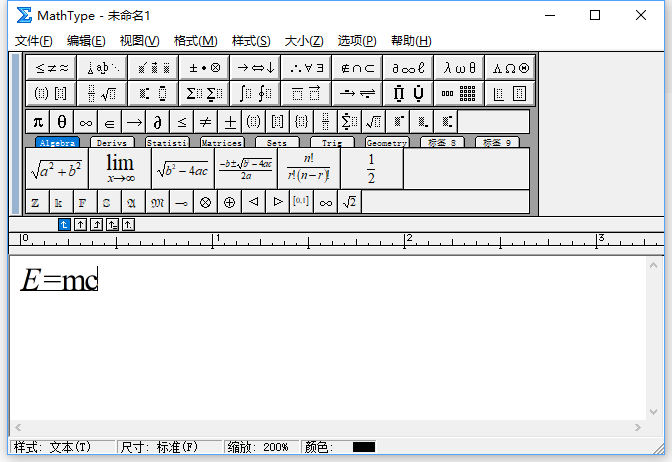
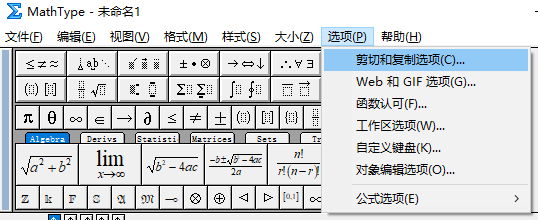
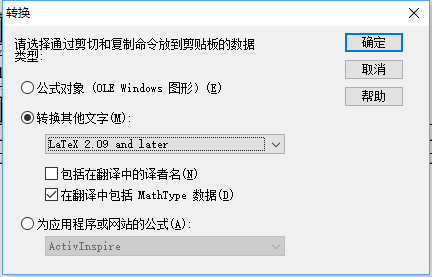
    <content type="html"><![CDATA[<h3 id="推荐Latex书写工具"><a href="#推荐Latex书写工具" class="headerlink" title="推荐Latex书写工具"></a>推荐Latex书写工具</h3><blockquote><p>画图工具：<a href="https://www.draw.io/" target="_blank" rel="noopener">https://www.draw.io/</a></p><p>画表格工具：<a href="https://tablesgenerator.com/" target="_blank" rel="noopener">https://tablesgenerator.com/</a></p><p>在线写文档工具：<a href="https://www.overleaf.com" target="_blank" rel="noopener">https://www.overleaf.com</a></p></blockquote><h3 id="将数学公式转换为Latex"><a href="#将数学公式转换为Latex" class="headerlink" title="将数学公式转换为Latex"></a>将数学公式转换为Latex</h3><blockquote><ol><li><p>使用MathType 编辑数学公式</p><p><img src="https://www.zkeenly.com/images/2019-02-15-1.png" alt="1550221140686"></p></li><li><p>选项-剪切和复制选项</p><p><img src="https://www.zkeenly.com/images/2019-02-15-2.png" alt="1550221635453"></p></li><li><p>选择转换为latex</p><p><img src="https://www.zkeenly.com/images/2019-02-15-3.png" alt="1550221725345"></p></li><li><p>复制到notepad中即可看到latex格式的公式</p><p><code>\[E{\rm{ = mc}}\]</code></p></li></ol></blockquote><p>表格全文居中</p><p>图像排列</p><p>文献引用</p><p>整体流程</p><p>引用文献的article 和// </p>]]></content>
    
    <summary type="html">


        &lt;h3 id=&quot;推荐Latex书写工具&quot;&gt;&lt;a href=&quot;#推荐Latex书写工具&quot; class=&quot;headerlink&quot; title=&quot;推荐Latex书写工具&quot;&gt;&lt;/a&gt;推荐Latex书写工具&lt;/h3&gt;&lt;blockquote&gt;
&lt;p&gt;画图工具：&lt;a href=&quot;https:/
      
    
    </summary>
    
    
  </entry>
  
  <entry>
    <title>Tensorflow部分层初始化参数以及finetune</title>
    <link href="https://zkeenly.github.io/2019/01/10/tensorflow%E9%83%A8%E5%88%86%E5%B1%82%E5%88%9D%E5%A7%8B%E5%8C%96%E5%8F%82%E6%95%B0%E4%BB%A5%E5%8F%8Afinetune/"/>
    <id>https://zkeenly.github.io/2019/01/10/tensorflow部分层初始化参数以及finetune/</id>
    <published>2019-01-10T09:59:00.000Z</published>
    <updated>2019-01-17T08:12:54.000Z</updated>
    
    <content type="html"><![CDATA[<p>本文在 tensorflow+slim 中实现基于原始卷积网络扩展增加新的层，然后finetune新的网络层参数。</p><h3 id="1，锁定部分变量（网络层），只finetune另一部分变量-网络层"><a href="#1，锁定部分变量（网络层），只finetune另一部分变量-网络层" class="headerlink" title="1，锁定部分变量（网络层），只finetune另一部分变量(网络层)"></a>1，锁定部分变量（网络层），只finetune另一部分变量(网络层)</h3><p>首先重置默认图,防止出现意外错误</p><figure class="highlight python"><table><tr><td class="gutter"><pre><span class="line">1</span><br></pre></td><td class="code"><pre><span class="line">tf.reset_default_graph()  <span class="comment"># 重置默认图。</span></span><br></pre></td></tr></table></figure><p>定义网络操作pipeline,其中network为使用slim-api定义的一些列卷积操作</p><figure class="highlight python"><table><tr><td class="gutter"><pre><span class="line">1</span><br><span class="line">2</span><br><span class="line">3</span><br><span class="line">4</span><br><span class="line">5</span><br></pre></td><td class="code"><pre><span class="line">in_image = tf.placeholder(tf.float32, [<span class="keyword">None</span>, <span class="keyword">None</span>, <span class="keyword">None</span>, <span class="number">4</span>])</span><br><span class="line">gt_image = tf.placeholder(tf.float32, [<span class="keyword">None</span>, <span class="keyword">None</span>, <span class="keyword">None</span>, <span class="number">3</span>])</span><br><span class="line">out_image = network(in_image)  <span class="comment"># 定义pipeline</span></span><br><span class="line">G_loss = tf.reduce_mean(tf.abs(out_image - gt_image))  <span class="comment"># 定义损失函数</span></span><br><span class="line">lr = tf.placeholder(tf.float32)  <span class="comment"># 定义学习率</span></span><br></pre></td></tr></table></figure><p>获取所有的网络参数(即定义网络层的scope=””)</p><figure class="highlight python"><table><tr><td class="gutter"><pre><span class="line">1</span><br></pre></td><td class="code"><pre><span class="line">t_vars = tf.trainable_variables()  <span class="comment"># 获取所有的变量</span></span><br></pre></td></tr></table></figure><p>分别获取需要保持不变的变量和需要finetune的变量,scope中包含<code>g_add</code>的为附加finetune层.</p><figure class="highlight python"><table><tr><td class="gutter"><pre><span class="line">1</span><br><span class="line">2</span><br></pre></td><td class="code"><pre><span class="line">g_vars = [var <span class="keyword">for</span> var <span class="keyword">in</span> t_vars <span class="keyword">if</span> <span class="string">'g_add'</span> <span class="keyword">in</span> var.name]  <span class="comment"># 附加的finetune网络层</span></span><br><span class="line">var_list = [var <span class="keyword">for</span> var <span class="keyword">in</span> t_vars <span class="keyword">if</span> <span class="string">'g_conv'</span> <span class="keyword">in</span> var.name]  <span class="comment"># 不需要改变的网络层</span></span><br></pre></td></tr></table></figure><p>生成train_op,使用<code>var_list=g_vars</code> 设置仅需要finetune的部分</p><figure class="highlight python"><table><tr><td class="gutter"><pre><span class="line">1</span><br></pre></td><td class="code"><pre><span class="line">G_opt = tf.train.AdamOptimizer(learning_rate=lr).minimize(G_loss, var_list=g_vars)  <span class="comment"># 只训练g_vars部分</span></span><br></pre></td></tr></table></figure><p>以上,其他部分按照正常操作即可以只训练g_vars部分,而不改变vart_list部分</p><h3 id="2，加载部分默认网络层参数-而不改变其他网络层的参数"><a href="#2，加载部分默认网络层参数-而不改变其他网络层的参数" class="headerlink" title="2，加载部分默认网络层参数,而不改变其他网络层的参数"></a>2，加载部分默认网络层参数,而不改变其他网络层的参数</h3><p>首先定义variables_to_restore,其中<code>exclude=[&quot;g_add&quot;]</code> 为不需要恢复的变量,也可以使用<code>include=[&quot;g_conv&quot;]</code> 来定义仅需要恢复的变量.[12] [14]</p><figure class="highlight python"><table><tr><td class="gutter"><pre><span class="line">1</span><br></pre></td><td class="code"><pre><span class="line">variables_to_restore = slim.get_variables_to_restore(exclude=[<span class="string">"g_add"</span>])  <span class="comment"># 一定要双引号,否则仅exclude 'g_add'一个层.</span></span><br></pre></td></tr></table></figure><p>建立一个re_saver来从已有的模型中恢复g_conv系列参数到网络中.<br><figure class="highlight python"><table><tr><td class="gutter"><pre><span class="line">1</span><br></pre></td><td class="code"><pre><span class="line">re_saver = tf.train.Saver(variables_to_restore)  <span class="comment"># 建立一个saver 用来保存需要恢复的模型变量</span></span><br></pre></td></tr></table></figure></p><p>再建立一个saver,用来训练的时候保存整个模型的ckpt</p><figure class="highlight python"><table><tr><td class="gutter"><pre><span class="line">1</span><br></pre></td><td class="code"><pre><span class="line">saver = tf.train.Saver()  <span class="comment"># 建立一个模型，用来保存所有的模型变量</span></span><br></pre></td></tr></table></figure><p>将外置模型参数加载到将要训练的模型sess中,并且初始化其余未初始化的参数,训练以及保存模型.<br><figure class="highlight python"><table><tr><td class="gutter"><pre><span class="line">1</span><br><span class="line">2</span><br><span class="line">3</span><br><span class="line">4</span><br><span class="line">5</span><br><span class="line">6</span><br><span class="line">7</span><br><span class="line">8</span><br><span class="line">9</span><br></pre></td><td class="code"><pre><span class="line"><span class="keyword">with</span> tf.Session() <span class="keyword">as</span> sess:</span><br><span class="line">    model_path = <span class="string">'./model.ckpt'</span>  <span class="comment"># 后缀名称仅需要写ckpt即可,后面的00001-00000不必添加</span></span><br><span class="line">    re_saver.restore(sess=sess, save_path=model_path)  <span class="comment"># 恢复模型的参数到新的模型</span></span><br><span class="line">    un_init = tf.variables_initializer(get_uninitialized_variables(sess))  <span class="comment"># 获取没有初始化(通过已有model加载)的变量 </span></span><br><span class="line">    sess.run(un_init)  <span class="comment"># 对没有初始化的变量进行初始化并训练.</span></span><br><span class="line">    <span class="keyword">for</span> epoch <span class="keyword">in</span> range(lastepoch, <span class="number">4001</span>):</span><br><span class="line">    _, G_current, output = sess.run([G_opt, G_loss, out_image],</span><br><span class="line">                                        feed_dict=&#123;in_image: input_patch, gt_image: gt_patch, lr: learning_rate&#125;)  <span class="comment"># 执行训练</span></span><br><span class="line">    saver.save(sess, checkpoint_dir + <span class="string">'model.ckpt'</span>)  <span class="comment"># 使用saver.save保存训练模型</span></span><br></pre></td></tr></table></figure></p><h3 id="总结"><a href="#总结" class="headerlink" title="总结"></a>总结</h3><p>​    网上查的资料大多大同小异,但是有一点都未曾提及,就是训练中保存变量的时候不应该用恢复网络参数所使用的saver来保存全部的参数.否则将只保存原始加载的那部分参数.而新finetune 的layer将无法保存.导致再测试的时候出现找不到某些层的bug</p><p><code>[TensorFlow: NotFoundError: Key not found in checkpoint]</code></p><p>引用：</p><p>[1] <a href="http://www.tensorfly.cn/tfdoc/how_tos/variables.html" target="_blank" rel="noopener">http://www.tensorfly.cn/tfdoc/how_tos/variables.html</a></p><p>[2] <a href="https://blog.csdn.net/wjc1182511338/article/details/82112181" target="_blank" rel="noopener">https://blog.csdn.net/wjc1182511338/article/details/82112181</a>  获得未初始化的变量</p><p>[3] <a href="https://blog.csdn.net/mr_muli/article/details/80868826" target="_blank" rel="noopener">https://blog.csdn.net/mr_muli/article/details/80868826</a></p><p>[4] <a href="https://blog.csdn.net/ArtistA/article/details/52860050" target="_blank" rel="noopener">https://blog.csdn.net/ArtistA/article/details/52860050</a></p><p>[5] <a href="https://zhuanlan.zhihu.com/p/42183653" target="_blank" rel="noopener">https://zhuanlan.zhihu.com/p/42183653</a></p><p>[6] <a href="https://www.quora.com/Is-it-possible-to-only-train-the-final-layer-of-a-Neural-Net-in-TensorFlow-that-was-already-trained" target="_blank" rel="noopener">https://www.quora.com/Is-it-possible-to-only-train-the-final-layer-of-a-Neural-Net-in-TensorFlow-that-was-already-trained</a></p><p>[7] <a href="https://stackoverflow.com/questions/37326002/is-it-possible-to-make-a-trainable-variable-not-trainable" target="_blank" rel="noopener">https://stackoverflow.com/questions/37326002/is-it-possible-to-make-a-trainable-variable-not-trainable</a></p><p>[8] <a href="https://stackoverflow.com/questions/45093499/how-to-fine-tune-weights-in-specific-layers-in-tensorflow" target="_blank" rel="noopener">https://stackoverflow.com/questions/45093499/how-to-fine-tune-weights-in-specific-layers-in-tensorflow</a></p><p>[9] <a href="https://stackoverflow.com/questions/34001922/failedpreconditionerror-attempting-to-use-uninitialized-in-tensorflow" target="_blank" rel="noopener">https://stackoverflow.com/questions/34001922/failedpreconditionerror-attempting-to-use-uninitialized-in-tensorflow</a></p><p>[10] <a href="https://stackoverflow.com/questions/47765595/tensorflow-attempting-to-use-uninitialized-value-beta1-power/47780342" target="_blank" rel="noopener">https://stackoverflow.com/questions/47765595/tensorflow-attempting-to-use-uninitialized-value-beta1-power/47780342</a></p><p>[11] <a href="https://blog.csdn.net/u011961856/article/details/76850335" target="_blank" rel="noopener">https://blog.csdn.net/u011961856/article/details/76850335</a></p><p>[12] <a href="https://blog.csdn.net/abc8350712/article/details/78437250" target="_blank" rel="noopener">https://blog.csdn.net/abc8350712/article/details/78437250</a></p><p>[13] <a href="http://mashangxue123.com/TensorFlow/687648778.html" target="_blank" rel="noopener">http://mashangxue123.com/TensorFlow/687648778.html</a></p><p>[14] <a href="https://github.com/tensorflow/tensorflow/tree/master/tensorflow/contrib/slim" target="_blank" rel="noopener">https://github.com/tensorflow/tensorflow/tree/master/tensorflow/contrib/slim</a></p><p>[15] <a href="https://cv-tricks.com/tensorflow-tutorial/save-restore-tensorflow-models-quick-complete-tutorial/?tdsourcetag=s_pctim_aiomsg" target="_blank" rel="noopener">https://cv-tricks.com/tensorflow-tutorial/save-restore-tensorflow-models-quick-complete-tutorial/?tdsourcetag=s_pctim_aiomsg</a></p><p>[16] <a href="https://github.com/cchen156/Learning-to-See-in-the-Dark" target="_blank" rel="noopener">https://github.com/cchen156/Learning-to-See-in-the-Dark</a></p>]]></content>
    
    <summary type="html">


        &lt;p&gt;本文在 tensorflow+slim 中实现基于原始卷积网络扩展增加新的层，然后finetune新的网络层参数。&lt;/p&gt;
&lt;h3 id=&quot;1，锁定部分变量（网络层），只finetune另一部分变量-网络层&quot;&gt;&lt;a href=&quot;#1，锁定部分变量（网络层），只finetun
      
    
    </summary>
    
      <category term="深度学习" scheme="https://zkeenly.github.io/categories/%E6%B7%B1%E5%BA%A6%E5%AD%A6%E4%B9%A0/"/>
    
    
      <category term="tensorflow" scheme="https://zkeenly.github.io/tags/tensorflow/"/>
    
      <category term="slim" scheme="https://zkeenly.github.io/tags/slim/"/>
    
  </entry>
  
  <entry>
    <title>修改Tensorflow张量指定元素值</title>
    <link href="https://zkeenly.github.io/2019/01/10/%E4%BF%AE%E6%94%B9tensorflow%E5%BC%A0%E9%87%8F%E6%8C%87%E5%AE%9A%E5%85%83%E7%B4%A0%E5%80%BC/"/>
    <id>https://zkeenly.github.io/2019/01/10/修改tensorflow张量指定元素值/</id>
    <published>2019-01-10T09:14:19.000Z</published>
    <updated>2019-01-10T09:55:37.958Z</updated>
    
    <content type="html"><![CDATA[<p>引用：</p><p><a href="https://blog.csdn.net/Strive_For_Future/article/details/82426015" target="_blank" rel="noopener">https://blog.csdn.net/Strive_For_Future/article/details/82426015</a></p><p><a href="https://blog.csdn.net/HowardWood/article/details/79587487" target="_blank" rel="noopener">https://blog.csdn.net/HowardWood/article/details/79587487</a></p>]]></content>
    
    <summary type="html">


        &lt;p&gt;引用：&lt;/p&gt;
&lt;p&gt;&lt;a href=&quot;https://blog.csdn.net/Strive_For_Future/article/details/82426015&quot; target=&quot;_blank&quot; rel=&quot;noopener&quot;&gt;https://blog.csdn.ne
      
    
    </summary>
    
    
  </entry>
  
  <entry>
    <title>Tensorboard监控slim网络中间层输出</title>
    <link href="https://zkeenly.github.io/2019/01/08/tensorboard%E7%9B%91%E6%8E%A7slim%E7%BD%91%E7%BB%9C%E4%B8%AD%E9%97%B4%E5%B1%82%E8%BE%93%E5%87%BA/"/>
    <id>https://zkeenly.github.io/2019/01/08/tensorboard监控slim网络中间层输出/</id>
    <published>2019-01-08T10:19:03.000Z</published>
    <updated>2019-01-08T10:58:29.752Z</updated>
    
    <content type="html"><![CDATA[<p>使用tensorboard查看中间层输出结果一般需要在源程序中添加以下几条命令</p><p>1:</p><figure class="highlight python"><table><tr><td class="gutter"><pre><span class="line">1</span><br><span class="line">2</span><br></pre></td><td class="code"><pre><span class="line">summary_op = tf.summary.merge_all()</span><br><span class="line">summary_writer = tf.summary.FileWriter(<span class="string">'./mid_result'</span>, tf.get_default_graph())</span><br></pre></td></tr></table></figure><p>需要添加在sess.run()开始循环迭代之前，不要添加在循环内部，可能会造成多次创建总结数据。</p><p>2:</p><figure class="highlight python"><table><tr><td class="gutter"><pre><span class="line">1</span><br><span class="line">2</span><br></pre></td><td class="code"><pre><span class="line">summary_str = sess.run(summary_op, feed_dict=&#123;in_image: input_full&#125;)</span><br><span class="line">summary_writer.add_summary(summary_str, <span class="number">1</span>)</span><br></pre></td></tr></table></figure><p>需要添加在sess.run()之后。</p><p>3：</p><p><code>show_feature_map_direct(layer=conv10, layer_name=&quot;conv10&quot;, num_or_size_splits=12, axis=3, max_outputs=3)</code></p><p>在每一个想要查看的中间层代码后，添加如上代码。</p><p>layer: 想要输出的层结果，</p><p>layer_name:输出层的scope/name,</p><p>num_or_size_splits:输出层的层数。</p><p>可以放在卷积层后，也可以放在残差层后：</p><p><code>conv10 = slim.conv2d(conv9, 12, [1, 1], rate=1, activation_fn=None, scope=&#39;g_conv10&#39;)</code></p><p><code>conv10 = tf.add(conv10, add_result, name=&#39;g_add_conv10&#39;)</code></p><p>4:</p><p>添加显示图函数到代码中供调用：</p><figure class="highlight plain"><table><tr><td class="gutter"><pre><span class="line">1</span><br><span class="line">2</span><br><span class="line">3</span><br><span class="line">4</span><br><span class="line">5</span><br></pre></td><td class="code"><pre><span class="line">def show_feature_map_direct(layer, layer_name, num_or_size_splits, axis, max_outputs):</span><br><span class="line">    split = tf.split(layer, num_or_size_splits=num_or_size_splits, axis=axis)</span><br><span class="line"></span><br><span class="line">    for i in range(num_or_size_splits):</span><br><span class="line">        tf.summary.image(layer_name + &quot;-&quot; + str(i), split[i], max_outputs)</span><br></pre></td></tr></table></figure><p>5：</p><p>运行时，在控制台命令行执行tensorboard命令，将会同时记录日志文件到mid_result文件夹中。</p><p><code>tensorboard --logdir=&#39;./mid_result&#39;</code></p><p>浏览器访问<a href="http://127.0.0.1:6006" target="_blank" rel="noopener">http://127.0.0.1:6006</a>  即可看到tensorboard的控制台。</p><p>6：</p><p>如果为远程服务器，可以从本地命令行新建立ssh链接</p><p><code>ssh -L 16006:127.0.0.1:6006 account@server.address</code></p><p>然后在本地浏览器访问<a href="http://127.0.0.1:16006" target="_blank" rel="noopener">http://127.0.0.1:16006</a> 即可查看tensorboard控制台。</p><p>引用：</p><p><a href="https://www.tensorflow.org/guide/summaries_and_tensorboard" target="_blank" rel="noopener">https://www.tensorflow.org/guide/summaries_and_tensorboard</a></p><p><a href="https://zhuanlan.zhihu.com/p/31865749?from_voters_page=true" target="_blank" rel="noopener">https://zhuanlan.zhihu.com/p/31865749?from_voters_page=true</a></p><p><a href="https://www.jianshu.com/p/4e8e5f516d84" target="_blank" rel="noopener">https://www.jianshu.com/p/4e8e5f516d84</a></p>]]></content>
    
    <summary type="html">


        &lt;p&gt;使用tensorboard查看中间层输出结果一般需要在源程序中添加以下几条命令&lt;/p&gt;
&lt;p&gt;1:&lt;/p&gt;
&lt;figure class=&quot;highlight python&quot;&gt;&lt;table&gt;&lt;tr&gt;&lt;td class=&quot;gutter&quot;&gt;&lt;pre&gt;&lt;span class=&quot;li
      
    
    </summary>
    
      <category term="深度学习" scheme="https://zkeenly.github.io/categories/%E6%B7%B1%E5%BA%A6%E5%AD%A6%E4%B9%A0/"/>
    
    
      <category term="python" scheme="https://zkeenly.github.io/tags/python/"/>
    
      <category term="深度学习" scheme="https://zkeenly.github.io/tags/%E6%B7%B1%E5%BA%A6%E5%AD%A6%E4%B9%A0/"/>
    
      <category term="tensorflow" scheme="https://zkeenly.github.io/tags/tensorflow/"/>
    
  </entry>
  
  <entry>
    <title>BayerRaw与RGB的转换</title>
    <link href="https://zkeenly.github.io/2018/11/18/BayerRaw%E4%B8%8ERGB%E7%9A%84%E8%BD%AC%E6%8D%A2/"/>
    <id>https://zkeenly.github.io/2018/11/18/BayerRaw与RGB的转换/</id>
    <published>2018-11-18T06:20:24.000Z</published>
    <updated>2018-12-09T07:05:42.809Z</updated>
    
    <content type="html"><![CDATA[<p>代码：<a href="https://github.com/zkeenly/articles/blob/master/RAW2RGB.py" target="_blank" rel="noopener">code</a><br>本文采取sony拍摄的arw格式图像测试，测试图像在<a href="https://github.com/cchen156/Learning-to-See-in-the-Dark" target="_blank" rel="noopener">论文</a>中下载：</p><p>bayer图像格式<br><img src="https://user-images.githubusercontent.com/6647857/47952226-e8512f80-dfa6-11e8-8a7a-facbd94c30e6.png" alt="image"><br>由于人眼对GREEN颜色的感知更为强烈，所以一般raw 格式的图像每个2*2矩阵中，都有两个G分量，一个R以及一个B分量，G分量的排列方式可以有所不同，如下图：<br><img width="302" alt="image" src="https://user-images.githubusercontent.com/6647857/47952815-36b6fc00-dfb0-11e8-999f-519c9f004b59.png"></p><p>对于转换为RGB格式，一般采取插值的方法，将原始图像中的R/G/B三个分量，插值到附近，分别产生新的三个矩阵，分别为R,G,B。<br><img width="117" alt="image" src="https://user-images.githubusercontent.com/6647857/47952791-db850980-dfaf-11e8-847b-0751b4fb98b8.png"><br>以下为代码，对于两个G分量采用均值方法优化插值：</p><p><img width="423" alt="image" src="https://user-images.githubusercontent.com/6647857/47952218-c0fa6280-dfa6-11e8-9ce1-1feb84a3008f.png"></p><p>1-自己写的函数最终得到图像结果：<br>放大：<br><img width="600" alt="image" src="https://user-images.githubusercontent.com/6647857/47952892-f0ae6800-dfb0-11e8-9bbb-51b472db5740.png"><br>原图：<br><img width="600" alt="image" src="https://user-images.githubusercontent.com/6647857/47952822-4a626280-dfb0-11e8-8d16-fcea9ab15813.png"></p><p>2-使用sony插件直接查看arw图像的结果：<br>放大：<br><img width="600" alt="image" src="https://user-images.githubusercontent.com/6647857/47952873-d07ea900-dfb0-11e8-9cd6-406e80d583b0.png"><br>原图：<br><img width="600" alt="image" src="https://user-images.githubusercontent.com/6647857/47952832-6f56d580-dfb0-11e8-9277-4f973f0e8fb8.png"></p><p>3-使用python rawpy库函数的postprocess 方法默认参数处理：<br>放大：<br><img width="600" alt="image" src="https://user-images.githubusercontent.com/6647857/47952898-00c64780-dfb1-11e8-974c-28adb36d771e.png"><br>原图：<br><img width="600" alt="image" src="https://user-images.githubusercontent.com/6647857/47952854-990ffc80-dfb0-11e8-9c54-83e15026a3e5.png"></p><p>4-使用learning to see in dark 中的postprocess 方法所设置的参数处理：<br>rgb = raw.postprocess(use_camera_wb=True, half_size=False, no_auto_bright=True, output_bps=16)<br>放大：<br><img width="600" alt="image" src="https://user-images.githubusercontent.com/6647857/47952903-0f146380-dfb1-11e8-82b4-4ef52cd2c49e.png"><br>原图：<br><img width="600" alt="image" src="https://user-images.githubusercontent.com/6647857/47952865-c0ff6000-dfb0-11e8-98dd-013d85bb501a.png"></p><p>最终分析结果：<br>再亮度上：<br>2&gt;3&gt;4&gt;1</p><p>在视觉效果上：<br>4&gt;2&gt;3&gt;1<br>在清晰度上：<br>4=3&gt;2=1<br>在还原RGB方面，使用参数调节后的rawpy.postprocess方法（use_camera_wb）更好。<br>造成以上差异的主要因素还是插值方法的不同：<br>在文章HIGH-QUALITY LINEAR INTERPOLATION FOR DEMOSAICING OF BAYER-PATTERNED COLOR IMAGES 中介绍了更好的插值方法：<br><img width="357" alt="image" src="https://user-images.githubusercontent.com/6647857/47953171-c9599a00-dfb4-11e8-8c12-5343fff0d97f.png"></p><p>引用：<br><a href="https://letmaik.github.io/rawpy/api/rawpy.Params.html" target="_blank" rel="noopener">https://letmaik.github.io/rawpy/api/rawpy.Params.html</a><br><a href="https://www.microsoft.com/en-us/research/wp-content/uploads/2016/02/Demosaicing_ICASSP04.pdf" target="_blank" rel="noopener">https://www.microsoft.com/en-us/research/wp-content/uploads/2016/02/Demosaicing_ICASSP04.pdf</a><br><a href="http://www.imatest.com/docs/raw/" target="_blank" rel="noopener">http://www.imatest.com/docs/raw/</a><br><a href="http://blog.sina.com.cn/s/blog_ebbe6d790101e56e.html" target="_blank" rel="noopener">http://blog.sina.com.cn/s/blog_ebbe6d790101e56e.html</a><br><a href="https://blog.csdn.net/peng864534630/article/details/78177211" target="_blank" rel="noopener">https://blog.csdn.net/peng864534630/article/details/78177211</a><br><a href="https://www.cnblogs.com/zhongguo135/p/7755287.html" target="_blank" rel="noopener">https://www.cnblogs.com/zhongguo135/p/7755287.html</a><br>Learning-to-see-in-draking</p>]]></content>
    
    <summary type="html">


        &lt;p&gt;代码：&lt;a href=&quot;https://github.com/zkeenly/articles/blob/master/RAW2RGB.py&quot; target=&quot;_blank&quot; rel=&quot;noopener&quot;&gt;code&lt;/a&gt;&lt;br&gt;本文采取sony拍摄的arw格式图像测试，测
      
    
    </summary>
    
      <category term="图像处理" scheme="https://zkeenly.github.io/categories/%E5%9B%BE%E5%83%8F%E5%A4%84%E7%90%86/"/>
    
    
      <category term="图像处理" scheme="https://zkeenly.github.io/tags/%E5%9B%BE%E5%83%8F%E5%A4%84%E7%90%86/"/>
    
      <category term="python" scheme="https://zkeenly.github.io/tags/python/"/>
    
  </entry>
  
  <entry>
    <title>Tensorflow中slice与cancat的使用</title>
    <link href="https://zkeenly.github.io/2018/11/18/Tensorflow%E4%B8%ADslice%E4%B8%8Ecancat%E7%9A%84%E4%BD%BF%E7%94%A8/"/>
    <id>https://zkeenly.github.io/2018/11/18/Tensorflow中slice与cancat的使用/</id>
    <published>2018-11-18T06:20:13.000Z</published>
    <updated>2018-11-18T06:27:24.403Z</updated>
    
    <content type="html"><![CDATA[<p>两个函数都是卷积神经网络中的常见操作，<br>再修改tf.conrib.slim 程序时，slim 没有自带的slice操作，但是可以直接使用tf的slice操作代替。<br><figure class="highlight plain"><table><tr><td class="gutter"><pre><span class="line">1</span><br><span class="line">2</span><br><span class="line">3</span><br><span class="line">4</span><br><span class="line">5</span><br><span class="line">6</span><br><span class="line">7</span><br><span class="line">8</span><br></pre></td><td class="code"><pre><span class="line">t = tf.constant([[[1, 1, 1], [2, 2, 2]],</span><br><span class="line">                 [[3, 3, 3], [4, 4, 4]],</span><br><span class="line">                 [[5, 5, 5], [6, 6, 6]]])</span><br><span class="line">tf.slice(t, [1, 0, 0], [1, 1, 3])  # [[[3, 3, 3]]]</span><br><span class="line">tf.slice(t, [1, 0, 0], [1, 2, 3])  # [[[3, 3, 3],</span><br><span class="line">                                   #   [4, 4, 4]]]</span><br><span class="line">tf.slice(t, [1, 0, 0], [2, 1, 3])  # [[[3, 3, 3]],</span><br><span class="line">                                   #  [[5, 5, 5]]]</span><br></pre></td></tr></table></figure></p><p>其中后两个参数为 begin和 size。<br>begin 代表开始位置（每一个维度上从第几个元素开始截取）<br>size 代表每一个维度从begin位置上开始截取多少个元素</p><p>简单的说：<br>例子：<br><code>tf.slice(t, [1, 0, 0], [1, 1, 3])  # [[[3, 3, 3]]]</code><br>中的[1, 0, 0] ：<br>第一个1 代表从行 [[3, 3, 3], [4, 4, 4]] 开始截取。<br>第二个0 代表从[3, 3, 3] 开始截取<br>第三个0 代表从元素3 开始截取<br>中的[1, 1, 3] ：<br>第一个1 代表截取一个元素即[[3, 3, 3], [4, 4, 4]]<br>第二个1 代表截取一个元素即[3, 3, 3]<br>第三个3 代表截取三个元素即3，3，3<br>最终结果还原原始维度为：[[[3, 3, 3]]]</p><p>例子：<br><code>tf.slice(t, [1, 0, 0], [2, 1, 3])  # [[[3, 3, 3]],  [[5, 5, 5]]]</code><br>中的 [1, 0, 0]：<br>第一个1 代表从行 [[3, 3, 3], [4, 4, 4]] 开始截取。<br>第二个0 代表从[3, 3, 3] 开始截取<br>第三个0 代表从元素3 开始截取<br>中的 [2, 1, 3]：<br>第一个2 代表截取两个元素即<br>                 [[3, 3, 3], [4, 4, 4]],<br>                 [[5, 5, 5], [6, 6, 6]]<br>可以视为:<br>x = [3, 3, 3], [4, 4, 4]<br>y = [5, 5, 5], [6, 6, 6]<br>截取了[x,y]<br>第二个1代表上面的每一行(每一个元素x or y)截取一个子元素即<br>                 [[3, 3, 3]],<br>                 [[5, 5, 5]]<br>这里的每个单元素整体是：<br>x = [3, 3, 3]<br>y = [5, 5, 5]<br>第三个3 代表上面的每一个元素截取三个子元素即<br>3, 3, 3<br>5, 5, 5<br>最终结果还原原始维度为：<br>[[[3, 3, 3]],[[5, 5, 5]]]</p><p>在程序中如果没有确定的维度大小，可以用-1代表终止位置：<br><figure class="highlight plain"><table><tr><td class="gutter"><pre><span class="line">1</span><br><span class="line">2</span><br><span class="line">3</span><br><span class="line">4</span><br></pre></td><td class="code"><pre><span class="line">conv1 = slim.conv2d(input, 32, [3, 3], rate=1, activation_fn=lrelu, scope=&apos;g_conv1_1&apos;)</span><br><span class="line">conv1 = slim.conv2d(conv1, 32, [3, 3], rate=1, activation_fn=lrelu, scope=&apos;g_conv1_2&apos;)</span><br><span class="line">slice_1 = tf.slice(conv1, [0, 0, 0, 0], [-1, -1, -1, 16])</span><br><span class="line">slice_2 = tf.slice(conv1, [0, 0, 0, 16], [-1, -1, -1, 16])</span><br></pre></td></tr></table></figure></p><p><img width="385" alt="image" src="https://user-images.githubusercontent.com/6647857/48109926-656cf500-e284-11e8-8eee-341ec66cb880.png"></p><p>concat 的用法就比较简单了，但是要注意坐标的设置：<br><figure class="highlight plain"><table><tr><td class="gutter"><pre><span class="line">1</span><br><span class="line">2</span><br><span class="line">3</span><br><span class="line">4</span><br></pre></td><td class="code"><pre><span class="line">t1 = [[1, 2, 3], [4, 5, 6]]</span><br><span class="line">t2 = [[7, 8, 9], [10, 11, 12]]</span><br><span class="line">tf.concat([t1, t2], 0)  # [[1, 2, 3], [4, 5, 6], [7, 8, 9], [10, 11, 12]]</span><br><span class="line">tf.concat([t1, t2], 1)  # [[1, 2, 3, 7, 8, 9], [4, 5, 6, 10, 11, 12]]</span><br></pre></td></tr></table></figure></p><p>其中第二个参数0 代表以第1维合并，1代表第二维合并…</p><p><code>concat1 = tf.concat([slice_1, slice_2], axis=3)</code><br>例如上面的slice_1 与slice_2 的合并需要设置axis=3.<br><img width="364" alt="image" src="https://user-images.githubusercontent.com/6647857/48110019-db715c00-e284-11e8-84e3-4eae81c7b618.png"></p><p>引用：<br><a href="https://www.tensorflow.org/api_docs/python/tf/slice" target="_blank" rel="noopener">https://www.tensorflow.org/api_docs/python/tf/slice</a><br><a href="https://www.tensorflow.org/api_docs/python/tf/concat" target="_blank" rel="noopener">https://www.tensorflow.org/api_docs/python/tf/concat</a></p>]]></content>
    
    <summary type="html">


        &lt;p&gt;两个函数都是卷积神经网络中的常见操作，&lt;br&gt;再修改tf.conrib.slim 程序时，slim 没有自带的slice操作，但是可以直接使用tf的slice操作代替。&lt;br&gt;&lt;figure class=&quot;highlight plain&quot;&gt;&lt;table&gt;&lt;tr&gt;&lt;td cl
      
    
    </summary>
    
      <category term="深度学习" scheme="https://zkeenly.github.io/categories/%E6%B7%B1%E5%BA%A6%E5%AD%A6%E4%B9%A0/"/>
    
    
      <category term="python" scheme="https://zkeenly.github.io/tags/python/"/>
    
      <category term="深度学习" scheme="https://zkeenly.github.io/tags/%E6%B7%B1%E5%BA%A6%E5%AD%A6%E4%B9%A0/"/>
    
      <category term="tensorflow" scheme="https://zkeenly.github.io/tags/tensorflow/"/>
    
  </entry>
  
  <entry>
    <title>CNN中的参数量与占用内存计算</title>
    <link href="https://zkeenly.github.io/2018/11/18/CNN%E4%B8%AD%E7%9A%84%E5%8F%82%E6%95%B0%E9%87%8F%E4%B8%8E%E5%8D%A0%E7%94%A8%E5%86%85%E5%AD%98%E8%AE%A1%E7%AE%97/"/>
    <id>https://zkeenly.github.io/2018/11/18/CNN中的参数量与占用内存计算/</id>
    <published>2018-11-18T06:01:58.000Z</published>
    <updated>2018-11-18T06:02:28.743Z</updated>
    
    <content type="html"><![CDATA[<p>卷积网络的参数计算，实际上就是卷积核的数量统计。<br><img width="581" alt="image" src="https://user-images.githubusercontent.com/6647857/48416886-50182f00-e78c-11e8-8b17-c5d7da6a1bf0.png"><br>这张图很好的体现了卷积网络的过程：<br>假设input为三层，就需要三个卷积核对其分别卷积，之后将卷积结果累加得到一层特征图。<br>如果需要得到2层特征图的结果，就需要3 <em> （三个卷积核） 共需要六个卷积核来生成2层特征图。<br>每个卷积核由3 </em> 3个参数组成，所以上图共需要3 <em> 2 </em>（3 <em> 3）个参数。<br>input层的占用内存为3 </em>（5<em>5），output层的占用内存为2 </em>（3 * 3）。<br>于是就得到下图关于VGG16内存占用以及参数的计算结果：<br><img width="586" alt="image" src="https://user-images.githubusercontent.com/6647857/48417197-1c89d480-e78d-11e8-9c3c-66712274070b.png"></p><p>引用：<a href="http://cs231n.github.io/convolutional-networks/" target="_blank" rel="noopener">http://cs231n.github.io/convolutional-networks/</a></p>]]></content>
    
    <summary type="html">


        &lt;p&gt;卷积网络的参数计算，实际上就是卷积核的数量统计。&lt;br&gt;&lt;img width=&quot;581&quot; alt=&quot;image&quot; src=&quot;https://user-images.githubusercontent.com/6647857/48416886-50182f00-e78c-11
      
    
    </summary>
    
      <category term="深度学习" scheme="https://zkeenly.github.io/categories/%E6%B7%B1%E5%BA%A6%E5%AD%A6%E4%B9%A0/"/>
    
    
      <category term="深度学习" scheme="https://zkeenly.github.io/tags/%E6%B7%B1%E5%BA%A6%E5%AD%A6%E4%B9%A0/"/>
    
  </entry>
  
  <entry>
    <title>CNN中感受野的计算方法</title>
    <link href="https://zkeenly.github.io/2018/11/18/CNN%E4%B8%AD%E6%84%9F%E5%8F%97%E9%87%8E%E7%9A%84%E8%AE%A1%E7%AE%97%E6%96%B9%E6%B3%95/"/>
    <id>https://zkeenly.github.io/2018/11/18/CNN中感受野的计算方法/</id>
    <published>2018-11-18T06:01:07.000Z</published>
    <updated>2018-11-18T06:02:37.204Z</updated>
    
    <content type="html"><![CDATA[<p>简单的说，感受野就是当前卷积层每个像素点是从多少个input层的像素点通过不断卷积得到的。<br>一般卷积网络越深，每个像素的感受野就越大（反卷积则相反）， 这在目标识别/检测网络设计中起到一个很重要的参考因素。</p><p>计算公式：<br><img width="759" alt="image" src="https://user-images.githubusercontent.com/6647857/48189318-ddb5e200-e37a-11e8-8b1c-fd98ffdb6c89.png"></p><p><img width="761" alt="image" src="https://user-images.githubusercontent.com/6647857/48189462-3e451f00-e37b-11e8-882c-52e7e5030f5d.png"><br>假设有一个5<em>5的input层<br>通过kernel=3</em>3，padding=1，stride=2 的卷积方式<br>将会得到3<em>3的layer1.（下图为layer1元素对应在input layer中的位置）<br><img width="167" alt="image" src="https://user-images.githubusercontent.com/6647857/48199662-c802e580-e397-11e8-95e5-7acf7519d567.png"><br>其中，每一个元素都是input由3</em>3的kernel卷积生成，所以每一个像素的感受野为3</p><p><img width="712" alt="image" src="https://user-images.githubusercontent.com/6647857/48189781-e8bd4200-e37b-11e8-8864-9ba4a98eaac7.png"><br>将此层再通过kernel=3 <em> 3，padding=1，stride=2的卷积方式卷积。<br>将会得到2 </em> 2的layer2。<br><img width="156" alt="image" src="https://user-images.githubusercontent.com/6647857/48199704-ed8fef00-e397-11e8-9ef0-e47e1a5e3234.png"></p><p>此时，每一个元素都是由layer1的3 <em> 3个元素通过3 </em> 3的卷积核生成。<br>所以layer2的每个元素感受野为3 <em> 3个layer1元素的感受野。<br>然而layer1元素在原始数据上对应位置的排列如图：<br><img width="167" alt="image" src="https://user-images.githubusercontent.com/6647857/48199662-c802e580-e397-11e8-95e5-7acf7519d567.png"><br>相当于layer2每个元素都感知了3 </em> 3个layer1元素，然而layer1每个3<em>3在input上的实际感受野为7 </em> 7（每个元素都可以感知周边的九个元素。）<br><img width="172" alt="image" src="https://user-images.githubusercontent.com/6647857/48201743-026f8100-e39e-11e8-937c-39d101f1b506.png"></p><p>那么怎么计算呢，如果规定stride=1的，padding=1，kernel=3的话：每次卷积结果都会是同样尺寸的。<br>每次卷积都是扩大了一个边界的感受野，就是：(kernel-1)大小的区域。<br>那么加上约束stride=s之后，每次stride跳动并不会影响到下一层layer在本层的感受野，但是会影响到下下次layer在本层的感受野。<br>因为当前input-layer1的stride 无论多大，layer1在input上的感受野总是只与卷积核有关。<br>但是当进行到layer1-layer2,需要求知layer2在input上的感受野，就会受到input-layer1的stride影响，stride越大，所影响input的范围就越大（一般stride不会超过(k-1)/2的，这会造成部分元素无法感知）。<br>于是<br>input : r=1<br>input-&gt;layer1 : s=2,k=3,p=1<br>得到layer1感受野为r=r[input] + (k-1)</p><p>layer1-&gt;layer2 : s=2,k=3,p=1<br>得到layer2在input的感受野为r=r[layer1] + (k[1-&gt;2]-1) * s[input-&gt;layer1]</p><p>layer2-&gt;layer3 : s=2,k=3,p=1<br>得到layer3在layer1的感受野为r = r[layer2] + (k[2-&gt;3]-1) <em> s[layer1-&gt;layer2]<br>随着stride的累加，造成的感受野增加量也是成倍的扩大。<br>得到layer3的input感受野为r = r[layer2] + (k[2-&gt;3]-1) </em> s[layer1-&gt;layer2] * s[input-&gt;layer1]</p><p>因此得到一般化的公式：<br>r[current] = r[pre] + (k[pre-&gt;current]-1) <em> s[pre-&gt;current] </em> s[prepre-&gt;pre] <em> … </em> s[input-&gt;layer1]<br>此计算公式与padding是无关的。<br>其中： (k[pre-&gt;current]-1) <em> s[pre-&gt;current] </em> s[prepre-&gt;pre] <em> … </em> s[input-&gt;layer1] 是在上一层感受野基础上多出来的(k-1)边界造成在input上的感受野。</p><p>引用：<br><a href="https://medium.com/mlreview/a-guide-to-receptive-field-arithmetic-for-convolutional-neural-networks-e0f514068807" target="_blank" rel="noopener">https://medium.com/mlreview/a-guide-to-receptive-field-arithmetic-for-convolutional-neural-networks-e0f514068807</a><br><a href="https://mathematica.stackexchange.com/questions/133927/how-to-compute-the-receptive-field-of-a-neuron" target="_blank" rel="noopener">https://mathematica.stackexchange.com/questions/133927/how-to-compute-the-receptive-field-of-a-neuron</a><br><a href="https://stackoverflow.com/questions/35582521/how-to-calculate-receptive-field-size" target="_blank" rel="noopener">https://stackoverflow.com/questions/35582521/how-to-calculate-receptive-field-size</a><br><a href="https://www.reddit.com/r/MachineLearning/comments/6o6cr8/d_how_does_one_calculate_the_receptive_field_of_a/" target="_blank" rel="noopener">https://www.reddit.com/r/MachineLearning/comments/6o6cr8/d_how_does_one_calculate_the_receptive_field_of_a/</a></p>]]></content>
    
    <summary type="html">


        &lt;p&gt;简单的说，感受野就是当前卷积层每个像素点是从多少个input层的像素点通过不断卷积得到的。&lt;br&gt;一般卷积网络越深，每个像素的感受野就越大（反卷积则相反）， 这在目标识别/检测网络设计中起到一个很重要的参考因素。&lt;/p&gt;
&lt;p&gt;计算公式：&lt;br&gt;&lt;img width=&quot;75
      
    
    </summary>
    
      <category term="深度学习" scheme="https://zkeenly.github.io/categories/%E6%B7%B1%E5%BA%A6%E5%AD%A6%E4%B9%A0/"/>
    
    
      <category term="深度学习" scheme="https://zkeenly.github.io/tags/%E6%B7%B1%E5%BA%A6%E5%AD%A6%E4%B9%A0/"/>
    
  </entry>
  
  <entry>
    <title>[ACM/算法]探索大海</title>
    <link href="https://zkeenly.github.io/2018/11/17/ACM-%E7%AE%97%E6%B3%95-%E6%8E%A2%E7%B4%A2%E5%A4%A7%E6%B5%B7/"/>
    <id>https://zkeenly.github.io/2018/11/17/ACM-算法-探索大海/</id>
    <published>2018-11-17T13:45:25.000Z</published>
    <updated>2018-12-20T05:12:15.941Z</updated>
    
    <content type="html"><![CDATA[<p>题目：<br><img src="https://user-images.githubusercontent.com/6647857/46867553-fa342c80-ce57-11e8-864c-bc67a02c0e0c.png" alt="image"></p><p>解决方法：<br>这道题一眼看去可能是深度/广度优先遍历，这样做时间复杂度会比较高，也可以采用并查集的思想，具体是：<br>先把所有的大海的点当作坐标存入list-position_array中，<br>然后将我存入classify_array，<br>对这个position_array 进行遍历，凡是与calssify_array中元素距离等于1的，都移除存入classify_array中。当所有的距离为1的点都遍历完全之后，classify_array 的元素个数就是所能够达到的面积</p><p>这个程序其实还适用于对于目标聚类的算法（可以说算是KNN算法的实现）如下图所示：<br><img src="https://user-images.githubusercontent.com/6647857/46905245-15b83980-cf23-11e8-9b60-46071558f348.png" alt="image"><br>对以上目标聚类<br>下面代码中存入classify_array的时候加入了类别classify_number 元素，如此当一个类别的元素分类完毕之后classify_number +1,继续计算下一个分类。最终会得到带有类别标签的list集合。</p><p>classify_array.append((position_array[0], classify_number))<br><a href="https://github.com/zkeenly/articles/blob/master/%E6%8E%A2%E7%B4%A2%E5%A4%A7%E6%B5%B7.py" target="_blank" rel="noopener">探索大海</a></p>]]></content>
    
    <summary type="html">


        &lt;p&gt;题目：&lt;br&gt;&lt;img src=&quot;https://user-images.githubusercontent.com/6647857/46867553-fa342c80-ce57-11e8-864c-bc67a02c0e0c.png&quot; alt=&quot;image&quot;&gt;&lt;/p&gt;
&lt;p
      
    
    </summary>
    
      <category term="ACM/算法" scheme="https://zkeenly.github.io/categories/ACM-%E7%AE%97%E6%B3%95/"/>
    
    
      <category term="算法" scheme="https://zkeenly.github.io/tags/%E7%AE%97%E6%B3%95/"/>
    
  </entry>
  
  <entry>
    <title>[ACM/算法]五子棋</title>
    <link href="https://zkeenly.github.io/2018/11/17/ACM-%E7%AE%97%E6%B3%95-%E4%BA%94%E5%AD%90%E6%A3%8B/"/>
    <id>https://zkeenly.github.io/2018/11/17/ACM-算法-五子棋/</id>
    <published>2018-11-17T12:44:10.000Z</published>
    <updated>2018-12-20T05:12:06.669Z</updated>
    
    <content type="html"><![CDATA[<p>问题：<br><img src="https://user-images.githubusercontent.com/6647857/46867024-26e74480-ce56-11e8-93d9-7c106b0321c8.png" alt="image"><br><img src="https://user-images.githubusercontent.com/6647857/46867037-3070ac80-ce56-11e8-999d-e56b22736a24.png" alt="image"></p><p>解决方法：<br>此题尚未完全AC，但是在牛客网另一道五子棋试题中稍加修改是可以AC的，当然是由于样例没有完全分析到的原因<br><a href="https://www.nowcoder.com/practice/a811535fed784ea492b63622c28c75c5?tpId=3&amp;&amp;tqId=10929&amp;rp=1&amp;ru=/activity/oj&amp;qru=/ta/hackathon/question-ranking" target="_blank" rel="noopener">牛客网-五子棋</a></p><p>这道题其实看起来是比较容易的，做起来也非麻烦的事情，就是每个点判断上下左右是否成立五子棋的标准。<br>但是我有一个比较普适性的且容易扩展的方法来解决，就是采用卷积滤波的方式，采用四个5*5的卷积滤波来对棋盘卷积判定，这样的方法对于六子棋，四子棋之类的都可以很容易扩展。<br>首先构建四个卷积滤波：<br>array_line = [[0, 0, 0, 0, 0],<br>​                [0, 0, 0, 0, 0],<br>​                [1, 1, 1, 1, 1],<br>​                [0, 0, 0, 0, 0],<br>​                [0, 0, 0, 0, 0]]<br>array_long = [[0, 0, 1, 0, 0],<br>​                [0, 0, 1, 0, 0],<br>​                [0, 0, 1, 0, 0],<br>​                [0, 0, 1, 0, 0],<br>​                [0, 0, 1, 0, 0]]<br>array_slant1 = [[1, 0, 0, 0, 0],<br>​                [0, 1, 0, 0, 0],<br>​                [0, 0, 1, 0, 0],<br>​                [0, 0, 0, 1, 0],<br>​                [0, 0, 0, 0, 1]]<br>array_slant2 = [[0, 0, 0, 0, 1],<br>​                [0, 0, 0, 1, 0],<br>​                [0, 0, 1, 0, 0],<br>​                [0, 1, 0, 0, 0],<br>​                [1, 0, 0, 0, 0]]<br>将原始棋盘进行上下左右padding0扩展（由于有可能出现第一行出现五个连续棋子的情况，所有必须要扩展边界。）<br>对逐个元素卷积判定。记录统计所有五子棋的情况个数。</p><p>代码不是很复杂，直接贴上来好了<br><a href="https://github.com/zkeenly/articles/blob/master/%E4%BA%94%E5%AD%90%E6%A3%8B.py" target="_blank" rel="noopener">五子棋</a></p>]]></content>
    
    <summary type="html">


        &lt;p&gt;问题：&lt;br&gt;&lt;img src=&quot;https://user-images.githubusercontent.com/6647857/46867024-26e74480-ce56-11e8-93d9-7c106b0321c8.png&quot; alt=&quot;image&quot;&gt;&lt;br&gt;&lt;im
      
    
    </summary>
    
      <category term="ACM/算法" scheme="https://zkeenly.github.io/categories/ACM-%E7%AE%97%E6%B3%95/"/>
    
    
      <category term="算法" scheme="https://zkeenly.github.io/tags/%E7%AE%97%E6%B3%95/"/>
    
  </entry>
  
  <entry>
    <title>[ACM/算法]Hilbert曲线</title>
    <link href="https://zkeenly.github.io/2018/11/17/ACM-%E7%AE%97%E6%B3%95-Hilbert%E6%9B%B2%E7%BA%BF/"/>
    <id>https://zkeenly.github.io/2018/11/17/ACM-算法-Hilbert曲线/</id>
    <published>2018-11-17T12:41:25.000Z</published>
    <updated>2018-12-20T05:11:54.986Z</updated>
    
    <content type="html"><![CDATA[<p>题目：<br><img src="https://user-images.githubusercontent.com/6647857/46865616-bc7fd580-ce50-11e8-9704-e85b531805b2.png" alt="image"><br><img src="https://user-images.githubusercontent.com/6647857/46865622-c1448980-ce50-11e8-97ea-050ce5104503.png" alt="image"><br><img src="https://user-images.githubusercontent.com/6647857/46865645-d9b4a400-ce50-11e8-9d04-4737ae7fd456.png" alt="image"><br><img src="https://user-images.githubusercontent.com/6647857/46865669-e5a06600-ce50-11e8-9c3d-10fa5cf3138f.png" alt="image"></p><p>解题方法：<br>首先po一个很直观的对hilbert的理解：<br><a href="https://www.bilibili.com/video/av4201747?from=search&amp;seid=12530994814698419444" target="_blank" rel="noopener">https://www.bilibili.com/video/av4201747?from=search&amp;seid=12530994814698419444</a><br>看完这个视频基本上就对这个曲线有所了解了，解法当然也就显而易见，就是首先构建一个基础的2<em>2的hilbert曲线轨迹<br><img src="https://user-images.githubusercontent.com/6647857/46866276-4c268380-ce53-11e8-8eac-86d0327bdb34.png" alt="image"><br>由于要求输出结果为顺序，定义一个以上轨迹顺序的矩阵base_box：<br>[[2 3]<br> [1 4]]<br>然后将这个base_box 扩展到4</em>4的矩阵中中上面两个2<em>2矩阵，<br>对于下面的连个2</em>2 矩阵，左下的矩阵进行逆时针旋转，右下的矩阵进行顺时针旋转。<br>然后将旋转之后的数字顺序反转一下<br>将左上2<em>2矩阵+4，右上+8，右下+12<br>就得到了hilbert矩阵<br>[[ 6  7 10 11]<br> [ 5  8  9 12]<br> [ 4  3 14 13]<br> [ 1  2 15 16]]<br>最终这个4</em>4的矩阵就做好了，下一次继续以此办法迭代将会得到8*8的矩阵。<br>[[22 23 26 27 38 39 42 43]<br> [21 24 25 28 37 40 41 44]<br> [20 19 30 29 36 35 46 45]<br> [17 18 31 32 33 34 47 48]<br> [16 13 12 11 54 53 52 49]<br> [15 14  9 10 55 56 51 50]<br> [ 2  3  8  7 58 57 62 63]<br> [ 1  4  5  6 59 60 61 64]]</p><p>附上code：<br><a href="https://github.com/zkeenly/articles/blob/master/hilbert.py" target="_blank" rel="noopener">hilbert</a><br>此程序输入输出：<br>输入：一个数字n<br>输出：n个hilbert矩阵，二阶，四阶，八阶…<br>如需题目输入输出样式可自行调节</p>]]></content>
    
    <summary type="html">


        &lt;p&gt;题目：&lt;br&gt;&lt;img src=&quot;https://user-images.githubusercontent.com/6647857/46865616-bc7fd580-ce50-11e8-9704-e85b531805b2.png&quot; alt=&quot;image&quot;&gt;&lt;br&gt;&lt;im
      
    
    </summary>
    
      <category term="ACM/算法" scheme="https://zkeenly.github.io/categories/ACM-%E7%AE%97%E6%B3%95/"/>
    
    
      <category term="算法" scheme="https://zkeenly.github.io/tags/%E7%AE%97%E6%B3%95/"/>
    
  </entry>
  
  <entry>
    <title>基于深度学习的“微博人像自动识别转发机器人”设计</title>
    <link href="https://zkeenly.github.io/2018/11/17/%E5%9F%BA%E4%BA%8E%E6%B7%B1%E5%BA%A6%E5%AD%A6%E4%B9%A0%E7%9A%84%E2%80%9C%E5%BE%AE%E5%8D%9A%E4%BA%BA%E5%83%8F%E8%87%AA%E5%8A%A8%E8%AF%86%E5%88%AB%E8%BD%AC%E5%8F%91%E6%9C%BA%E5%99%A8%E4%BA%BA%E2%80%9D%E8%AE%BE%E8%AE%A1/"/>
    <id>https://zkeenly.github.io/2018/11/17/基于深度学习的“微博人像自动识别转发机器人”设计/</id>
    <published>2018-11-17T12:36:15.000Z</published>
    <updated>2018-12-01T13:10:27.837Z</updated>
    
    <content type="html"><![CDATA[<p>源代码：<a href="https://github.com/zkeenly/fanfou_robot" target="_blank" rel="noopener">https://github.com/zkeenly/fanfou_robot</a></p><h1 id="V1-0更新："><a href="#V1-0更新：" class="headerlink" title="V1.0更新："></a>V1.0更新：</h1><h2 id="一，对网络结构调整："><a href="#一，对网络结构调整：" class="headerlink" title="一，对网络结构调整："></a>一，对网络结构调整：</h2><p>1，通过大量实验测试，最终在RESnet50与VGG16中使用VGG16。</p><p><img src="https://user-images.githubusercontent.com/6647857/43085632-089b2e82-8ece-11e8-9356-4d07fe9e4b6d.png" alt="image"></p><p>2，通过观察爬取的数据集特征，将训练数据集分为5类，分别为”人像“，“食物”，“文字”，“动物”，“风景”。</p><p>3，训练100次epoch</p><p>4，batchsize=24</p><p>5，imagesize = 120</p><p>最终实际运行准确度更加趋近稳定，对于动物误识别为人的概率大大减小。</p><p><img src="https://user-images.githubusercontent.com/6647857/43085653-19c0ce6a-8ece-11e8-9637-932df9c8fd4f.png" alt="image"></p><h2 id="二，增加更多的功能："><a href="#二，增加更多的功能：" class="headerlink" title="二，增加更多的功能："></a>二，增加更多的功能：</h2><p>1，将屏蔽转发用户写入为block_list文件，从文件中读取屏蔽用户。</p><p>2，当用户发送 “@深绘里 -quit”时，可以将自己列入屏蔽列表中，当发送”@深绘里 -join“，可以重新参与被检索。</p><p>3，当用户quit or join，通过私信告知用户。</p><p>4，为了提高检测精准度，预测图像的时候，对于 长 or 高（比例大于1：1.3） 的图像裁剪为上，中，下，以及整张图resize为正方形的四张图片进行预测，如果有一张检测为人像，并且另外三张没有同时检测为其他同一类型的图片，则正确分类为人像。</p><p>5，自动生成日志log文件，存放于log/log_.txt中。</p><p>6，修补bug（修改为运行时强制使用CPU运行，不占用GPU显存）。</p><p>7，修正被黑名单私信发送失败异常。</p><h1 id="程序逻辑设计概要"><a href="#程序逻辑设计概要" class="headerlink" title="程序逻辑设计概要"></a>程序逻辑设计概要</h1><p>本文实验采用Python+Keras作为主要语言，使用饭否API接口实现对微博用户上传的图片实时监控，通过多层卷积神经网络对采集图像进行识别，图像符合人群画像标准，则转发。通过对神经网络训练，识别准确率可达到82.5%。点击<a href="http://fanfou.com/uarepretty" target="_blank" rel="noopener">这里</a>查看微博链接。</p><h1 id="卷积神经网络设计"><a href="#卷积神经网络设计" class="headerlink" title="卷积神经网络设计"></a>卷积神经网络设计</h1><pre><code>本文采用对Lenet经典神经网络改进网络，网络结构如下：</code></pre><p><img src="https://user-images.githubusercontent.com/6647857/43085668-23d52bd0-8ece-11e8-9840-60f3ab0895bb.png" alt="image"></p><figure class="highlight plain"><table><tr><td class="gutter"><pre><span class="line">1</span><br><span class="line">2</span><br><span class="line">3</span><br><span class="line">4</span><br><span class="line">5</span><br><span class="line">6</span><br><span class="line">7</span><br><span class="line">8</span><br><span class="line">9</span><br><span class="line">10</span><br><span class="line">11</span><br><span class="line">12</span><br><span class="line">13</span><br><span class="line">14</span><br><span class="line">15</span><br><span class="line">16</span><br><span class="line">17</span><br><span class="line">18</span><br><span class="line">19</span><br></pre></td><td class="code"><pre><span class="line"># first set of CONV -&gt; RELU -&gt; POOL layers</span><br><span class="line">model.add(Conv2D(20, (5, 5), padding=&quot;same&quot;, input_shape=inputShape))</span><br><span class="line">model.add(Activation(&quot;relu&quot;))</span><br><span class="line">model.add(MaxPooling2D(pool_size=(2, 2), strides=(2, 2)))</span><br><span class="line"># second set of conv relu pool layers</span><br><span class="line">model.add(Conv2D(50, (5, 5), padding=&quot;same&quot;))</span><br><span class="line">model.add(Activation(&quot;relu&quot;))</span><br><span class="line">model.add(MaxPooling2D(pool_size=(2, 2), strides=(2, 2)))</span><br><span class="line"># triple set of conv relu pool layers</span><br><span class="line">model.add(Conv2D(20, (5, 5), padding=&quot;same&quot;))</span><br><span class="line">model.add(Activation(&quot;relu&quot;))</span><br><span class="line">model.add(MaxPooling2D(pool_size=(2, 2), strides=(2, 2)))</span><br><span class="line"># first (only) set of FC relu layers</span><br><span class="line">model.add(Flatten())</span><br><span class="line">model.add(Dense(500))</span><br><span class="line">model.add(Activation(&quot;relu&quot;))</span><br><span class="line"># softmax classifier</span><br><span class="line">model.add(Dense(classes))</span><br><span class="line">model.add(Activation(&quot;softmax&quot;))</span><br></pre></td></tr></table></figure><h1 id="数据集"><a href="#数据集" class="headerlink" title="数据集"></a>数据集</h1><p>对数据集采取二分类划分，类别为人像和非人像。数据集收集自饭否网。共计2168张图片，为了提高人像识别度，其中人像大于1.3：1尺寸的图像通过裁剪为三个等比例正方形方法扩展为共计489张。</p><h1 id="自动转发系统设计"><a href="#自动转发系统设计" class="headerlink" title="自动转发系统设计"></a>自动转发系统设计</h1><pre><code>转发系统采用python语言设计，通过饭否API （https://github.com/FanfouAPI/FanFouAPIDoc/wiki）获取系统微博信息。提取信息中的图像数据，使用训练好的model模型进行预测图像分类，若属于人像分类则通过API自动转发。</code></pre><p>自动转发系统日志：<br><img src="https://user-images.githubusercontent.com/6647857/43085860-9f39dcb2-8ece-11e8-96c6-ea600aefb7ca.png" alt="image"><br><img src="https://user-images.githubusercontent.com/6647857/43085874-a2af5354-8ece-11e8-9322-0d3916497a27.png" alt="image"></p><h1 id="机器人识别效果"><a href="#机器人识别效果" class="headerlink" title="机器人识别效果"></a>机器人识别效果</h1><p>通过35次epoch 迭代，训练准确度达到89%左右，验证准确度达到83%左右。由于采取验证图像数据集过于小，所以可以看出图中验证准确度波动较大，且loss较高。</p><p><img src="https://user-images.githubusercontent.com/6647857/43085887-aa83ba98-8ece-11e8-94dd-6ab0ed81e16c.png" alt="image"><br><img src="https://user-images.githubusercontent.com/6647857/43085903-b3a38be4-8ece-11e8-92f9-890dec21d1f1.png" alt="image"><br><a href="http://fanfou.com/uarepretty/" target="_blank" rel="noopener">http://fanfou.com/uarepretty/</a></p><h1 id="总结与展望"><a href="#总结与展望" class="headerlink" title="总结与展望"></a>总结与展望</h1><pre><code>虽然对于人像可以准确的识别，但是对于一些类人像特征的物体，如猫等。也会被误识别为人像并转发。</code></pre><p><img src="https://user-images.githubusercontent.com/6647857/43085923-bd4db520-8ece-11e8-96d6-ae4bc9adc08f.png" alt="image"></p><pre><code>其主要原因是网络结构过于浅，无法学习到更细节的特征，仅学习到了如眼睛，脸轮廓等。对于皮肤光滑程度没有很好的识别。如果采取更深层次的网络如ResNet50将会得到更好的效果。</code></pre>]]></content>
    
    <summary type="html">


        &lt;p&gt;源代码：&lt;a href=&quot;https://github.com/zkeenly/fanfou_robot&quot; target=&quot;_blank&quot; rel=&quot;noopener&quot;&gt;https://github.com/zkeenly/fanfou_robot&lt;/a&gt;&lt;/p&gt;
&lt;h1 
      
    
    </summary>
    
      <category term="项目" scheme="https://zkeenly.github.io/categories/%E9%A1%B9%E7%9B%AE/"/>
    
    
      <category term="项目" scheme="https://zkeenly.github.io/tags/%E9%A1%B9%E7%9B%AE/"/>
    
      <category term="饭否" scheme="https://zkeenly.github.io/tags/%E9%A5%AD%E5%90%A6/"/>
    
  </entry>
  
  <entry>
    <title>【生活记录】崴脚的治疗和恢复经历</title>
    <link href="https://zkeenly.github.io/2018/11/16/%E7%94%9F%E6%B4%BB%E8%AE%B0%E5%BD%95-%E5%B4%B4%E8%84%9A%E7%9A%84%E6%B2%BB%E7%96%97%E5%92%8C%E6%81%A2%E5%A4%8D%E7%BB%8F%E5%8E%86/"/>
    <id>https://zkeenly.github.io/2018/11/16/生活记录-崴脚的治疗和恢复经历/</id>
    <published>2018-11-16T04:26:42.000Z</published>
    <updated>2018-11-22T04:27:32.696Z</updated>
    
    <content type="html"><![CDATA[<p>2018年5月15日，在教学楼里下楼时，不经意之间突然听到一声巨响，发现是崴到脚了。随之而来的是剧烈的疼痛和肿胀。当时拖着肿胀的脚艰难的走到校医务室，简单诊断后，建议转到672骨科医院进一步拍摄CT诊断是否有骨折。此时打车到672医院，同时联系朋友前去接应。</p><p>到672医院后，挂号，就诊，拍摄CT查看无骨折。建议回去冰敷修养并建议使用支具支撑（医院收费700，当时并没有购买），腿抬高修养半月。开了几瓶药酒和恢复药物便回校了。</p><p>回去之后并没有严格的冰敷，因为感觉找冰还是有点难度的，其实事后想一想还是可以找到的，各种奶茶店或者买个雪糕也可以的。但是当时仅用冷水敷了几天，这大概也延长了恢复时间。另外支具在五天后意识到还是需要一个的，因为睡觉实在是不舒服，网购了支具固定后便方便了很多。另外推荐扶他林，对于轻度崴脚真的好用，止痛效果很好。</p><p>总结下来前期的恢复流程最好是：尽快冰敷1-2天+支具固定卧床抬高2周+双拐+后期持续热敷。</p><p>但是自身当时没有意识，各个流程都推迟了好多天。这可能也导致恢复缓慢的原因。一直持续到8月才可以正常走路（可缓慢行走），11月才基本恢复正常（但目前仍未尝试跑步等剧烈运动，且冷天需要佩戴脚护踝不能受冻否则会有隐痛，这可能是留下的后遗症吧，需要更长的时间恢复以及平时注意保护）。</p><p>希望有崴到脚的朋友引以为戒。另外无痛感后需要进行适当的运动恢复肌肉的功能。</p>]]></content>
    
    <summary type="html">


        &lt;p&gt;2018年5月15日，在教学楼里下楼时，不经意之间突然听到一声巨响，发现是崴到脚了。随之而来的是剧烈的疼痛和肿胀。当时拖着肿胀的脚艰难的走到校医务室，简单诊断后，建议转到672骨科医院进一步拍摄CT诊断是否有骨折。此时打车到672医院，同时联系朋友前去接应。&lt;/p&gt;
&lt;p&gt;
      
    
    </summary>
    
      <category term="杂事" scheme="https://zkeenly.github.io/categories/%E6%9D%82%E4%BA%8B/"/>
    
    
  </entry>
  
  <entry>
    <title>【生活记录】武汉大学口腔医院经历（根管治疗/拔牙/种植牙）</title>
    <link href="https://zkeenly.github.io/2018/11/15/%E7%94%9F%E6%B4%BB%E8%AE%B0%E5%BD%95-%E6%AD%A6%E6%B1%89%E5%A4%A7%E5%AD%A6%E5%8F%A3%E8%85%94%E5%8C%BB%E9%99%A2%E6%B2%BB%E7%96%97%E7%BB%8F%E5%8E%86%EF%BC%88%E6%A0%B9%E7%AE%A1%E6%B2%BB%E7%96%97-%E6%8B%94%E7%89%99-%E7%A7%8D%E6%A4%8D%E7%89%99%EF%BC%89/"/>
    <id>https://zkeenly.github.io/2018/11/15/生活记录-武汉大学口腔医院治疗经历（根管治疗-拔牙-种植牙）/</id>
    <published>2018-11-15T15:39:22.000Z</published>
    <updated>2021-07-04T10:17:28.760Z</updated>
    
    <content type="html"><![CDATA[<p>本文首发于简书，现转到个人博客，经验分享以及记录，非技术文章。</p><h3 id="前前言："><a href="#前前言：" class="headerlink" title="前前言："></a>前前言：</h3><blockquote><p>事情稍许久远，有些细节也许记忆不清。记录下来供对根管治疗，种植牙，牙齿外伤，智齿拔除等有疑问的患者参考，有任何疑问可留言交流。<br>本文部分图片可能引起不适，希望有必要的读者【谨慎考虑】后再阅读。</p></blockquote><p><img src="https://user-images.githubusercontent.com/6647857/48845303-1f14ab80-edd7-11e8-8312-e1d9b2de741f.png" alt="image"><br><code>武大口腔就医指导表格</code></p><h3 id="前言："><a href="#前言：" class="headerlink" title="前言："></a>前言：</h3><blockquote><p>意外总是突然的。2017年9月8日，本该是研究生开学初期最愉快的一段时期。然而一场意外悄然而来，晚10点后，于校内骑车摔伤。瞬间像梦境一般，血流不止，感受到多颗牙齿的严重折断损伤（想象被摔得满地找牙的画面感）。同时意识到事情的严重性，于第一时间寻找校医院。一番折腾，感谢校园保卫部，校医院以及舍友的帮助下。成功转院至广州军区武汉总医院急诊。</p></blockquote><h3 id="广州军区武汉总医院治疗经历"><a href="#广州军区武汉总医院治疗经历" class="headerlink" title="广州军区武汉总医院治疗经历"></a>广州军区武汉总医院治疗经历</h3><h4 id="2017-09-08-初次诊治"><a href="#2017-09-08-初次诊治" class="headerlink" title="2017/09.08 初次诊治"></a>2017/09.08 初次诊治</h4><blockquote><p>当晚急诊，医生检查结果牙齿多颗纵折/冠折+下颌骨具有骨折隐患+面部（下巴）外伤。在医生的建议下，先做了伤口的清洗与缝合上药（这里缝合使用的是普通缝合线，会留下伤疤。后面经过出租司机提醒，或许武大口腔可以使用美容线缝合，伤疤更小。不过我的伤口在下巴， 也就有点无所谓的感觉，除了剃胡子不太方便。），然后拍摄CT检查骨折隐患（报告单如下）。报告单显示未看到明显骨折。在医生的建议下于次日再进行三维重建CT，确认隐患。</p></blockquote><p><img src="https://user-images.githubusercontent.com/6647857/48845335-3489d580-edd7-11e8-9229-875474ce221f.png" alt="image"><br><code>伤口缝合后愈合图，可以看到缝合部分不生长胡须，且有疤痕</code></p><p><img src="https://user-images.githubusercontent.com/6647857/48845386-52573a80-edd7-11e8-8ae3-0ff3f8ac4057.png" alt="image"><br><code>费用清单</code></p><p><img src="https://user-images.githubusercontent.com/6647857/48845397-5d11cf80-edd7-11e8-9b9d-b44579afa226.png" alt="image"><br><code>报告清单</code></p><h4 id="2017-09-09-三维重建"><a href="#2017-09-09-三维重建" class="headerlink" title="2017.09.09 三维重建"></a>2017.09.09 三维重建</h4><blockquote><p>凌晨回到寝室休息之后，于次日清晨再次来到广州军区武汉总医院（小插曲：打车的时候遇见一位自称是医生的滴滴司机说：你这个情况应该到武汉口腔医院啊，哪边治疗效果更好，于是在司机的建议下去了口腔医院，拿号（普通号）排队，当时医生并没有考虑到骨折问题，只看了牙齿说要根管治疗（最严重的26）。但是当时考虑医保问题，遂暂缓治疗，回到广州军区总医院复查），要再次感谢辅导员和同学的帮助。这次拍摄了三维CT ，以及换药。三维CT需要等2天后再出片，此时家人也赶过来了，这两天外伤换药等片。三维重建费用较高。<br>tips: 三维重建这个CT，在武大口腔做的比较好，后面会有对比图。武大口腔的CT可以生成立体图片，甚至可以刻盘保存，而广州军区这里只有多方位的图片，视觉效果有点差。两个医院的实力/设备还是有很大差距的。</p></blockquote><p><img src="https://user-images.githubusercontent.com/6647857/48845418-6733ce00-edd7-11e8-84d6-e4aebd3f1a43.png" alt="image"><br><code>费用清单</code></p><h4 id="2017-09-12-住院广州军区武汉总医院"><a href="#2017-09-12-住院广州军区武汉总医院" class="headerlink" title="2017/09/12 住院广州军区武汉总医院"></a>2017/09/12 住院广州军区武汉总医院</h4><blockquote><p>住院期间，在医生的建议下，对治疗下颌骨骨折做了颌间牵引手术（就是在牙床上打钉子，用皮筋将上下牙齿牵引起来，使牙齿，颌骨无法活动）保持一个月后拆除牵引线以及钉子。一开始医生使用了八个牵引钉子，四个牵引线。但是有一个位置骨质疏松，无法固定牵引钉。故最终使用三个皮筋牵引（这里其实个人感觉两个牵引线，四个钉子就足够了，多打了四个孔，痛苦万分）。皮筋的牵引力都很大，一开始受不了痛苦（牙齿外伤有冠折纵折），遂开了洛索洛芬钠 释缓片。由于颌间牵引，所以吃饭全部为流食（后面痛苦的经历就是喝了一个月的豆浆/豆沫！！！连米粥都喝不成）。在医院输液静养一周后办理出院手续，此时下巴外伤也已经拆线（不可思议的是我在住院期间还去考了PET3，佩服自己的willpower）。<br>tips:做颌间牵引是有后遗症的，就是骨头不会完全对齐，张口左侧骨头会有异响（不知道以后会不会完全恢复如初，恢复到正常使用应该没问题），对于后期的咬合恢复很慢（我不太确定如果手术使用钢板固定会不会好一些，这样可能会留下伤疤）。而且牙齿中缝目前无法对齐。不知和颌骨损伤是否有关系。稍微偏差2mm。不过影响不太大。</p></blockquote><p><img src="https://user-images.githubusercontent.com/6647857/48845434-7155cc80-edd7-11e8-90ee-11e725e9f032.png" alt="image"><br><code>正常咬合下侧牙齿有向右轻微偏移</code></p><p><img src="https://user-images.githubusercontent.com/6647857/48845437-761a8080-edd7-11e8-9498-f84b653ec57f.png" alt="image"><br><code>洛索洛芬缓释片</code></p><p><img src="https://user-images.githubusercontent.com/6647857/48845445-7d418e80-edd7-11e8-975c-dacf30e156d9.png" alt="image"><br><code>可以看出在牙床上打了四个钉子（看起来像是打在了牙齿上），右侧箭头处有明显骨折线</code></p><p><img src="https://user-images.githubusercontent.com/6647857/48845451-816dac00-edd7-11e8-8988-c0cb4c3861ee.png" alt="image"><br><code>可以看到，牵引钉子已经拆除，颌骨骨折线也有所愈合。</code></p><p><img src="https://user-images.githubusercontent.com/6647857/48845471-8df20480-edd7-11e8-863b-5dc7971b3a00.png" alt="image"><br><code>出院小结</code></p><blockquote><p>其后多次拍摄影像图，直至骨折恢复后于2018年后开始于武汉大学口腔医院治疗牙齿损伤。</p></blockquote><h3 id="武汉大学口腔医院治疗牙齿"><a href="#武汉大学口腔医院治疗牙齿" class="headerlink" title="武汉大学口腔医院治疗牙齿"></a>武汉大学口腔医院治疗牙齿</h3><blockquote><p>2017/11/17 这是骨折逐渐恢复后第一次来武汉大学口腔医院寻求牙齿损伤的治疗方法。并拍摄3维CT影像。可以看出多颗牙齿折断。当时由于张口仍有一定程度的受限，所以暂缓治疗。</p></blockquote><p><img src="https://user-images.githubusercontent.com/6647857/48845483-93e7e580-edd7-11e8-8b1e-66960bacdb26.png" alt="image"><br><code>影像图</code></p><p><img src="https://user-images.githubusercontent.com/6647857/48845490-99ddc680-edd7-11e8-9ffb-84d29b7ee164.png" alt="image"><br><code>可以切换视角的3D影像图</code></p><h4 id="2018-01-25-确认治疗方案"><a href="#2018-01-25-确认治疗方案" class="headerlink" title="2018/01/25 确认治疗方案"></a>2018/01/25 确认治疗方案</h4><blockquote><p>多次拜访武汉大学口腔医院后，最终确认治疗方案。<br>1，洗牙；2，拔除26；3，16/45根管治疗。其他暂缓。</p></blockquote><p><img src="https://user-images.githubusercontent.com/6647857/48845503-a06c3e00-edd7-11e8-9531-75e932f028f0.png" alt="image"><br><code>整体建议</code></p><h4 id="2018-03-06-拔牙"><a href="#2018-03-06-拔牙" class="headerlink" title="2018/03/06 拔牙"></a>2018/03/06 拔牙</h4><blockquote><p>犹豫了许久之后，决定先拔除根折无法恢复的26牙齿，本来觉得是很难的事情，因为上牙床骨头稀少，怕拔除时候残片进入上颌窦。所以等主治医师亲自拔牙。打上麻醉之后并没有太多痛感，过程也出乎意料的顺利（10分钟左右）。经过不断晃动就拔掉了根折牙齿26。费用大约800<br>tips:其实有一种传统的方法，自体牙移植，可以将智齿拔除移动到缺失牙齿的位置，有一定的存活概率，看了不少的论文文献。有的说需要外部根管治疗再移植，有的说可以直接移植成活。最后问了口腔医院，说现在都不做这个了。其实有点遗憾，应该多找一找别的医院。可能有的医院是可以做这个手术的，据说是因为成本低，工艺复杂，所以医生都不想做。<br>ref：<a href="https://www.zhihu.com/question/39629006" target="_blank" rel="noopener">https://www.zhihu.com/question/39629006</a>  <a href="https://www.zhihu.com/question/34012960" target="_blank" rel="noopener">https://www.zhihu.com/question/34012960</a><br>看到又有新的成功案例，不禁更加后悔当时没有多找一下了。</p></blockquote><p><img src="https://user-images.githubusercontent.com/6647857/48845513-a8c47900-edd7-11e8-85b5-828f33ee607e.png" alt="image"><br><code>一些参考文献</code></p><p><img src="https://user-images.githubusercontent.com/6647857/48845530-ae21c380-edd7-11e8-9b83-7c27506cb2ee.png" alt="image"><br><code>恐怖的拔牙工具与根折残片</code></p><h4 id="2018-03-20-根管治疗"><a href="#2018-03-20-根管治疗" class="headerlink" title="2018/03/20 根管治疗"></a>2018/03/20 根管治疗</h4><blockquote><p>这是最近的事情了，做了两个牙齿的根管治疗，都很顺利。16找的主任医生，采用显微镜根管治疗。花费比较高，但是技术很好。根管两次成功，中间相隔20天（由于医生比较忙），第一次开髓，第二次填充。第二次一般不用打麻药，会有点疼。疼到不想再来第二次的那种！费用大约3000左右<br>其后五月份做了45的根管治疗，这次没有找主任医生，而是副主任。也是两次，间隔一周，很顺利。没有用到显微镜。全部费用大约1000左右</p></blockquote><h4 id="2018-06-07-瘘管"><a href="#2018-06-07-瘘管" class="headerlink" title="2018/06/07 瘘管"></a>2018/06/07 瘘管</h4><blockquote><p>5.20下巴出现瘘管，怀疑是牙源性瘘管。<br>在线问诊后，又询问校医院，说可能是缝针的排异反应。观察数日后于6.7日有所好转。</p></blockquote><p><img src="https://user-images.githubusercontent.com/6647857/48845663-140e4b00-edd8-11e8-9c80-39fbd35d96e1.png" alt="image"><br><code>咨询在线医生</code></p><h4 id="2018-06-11-武大口腔瘘管咨询"><a href="#2018-06-11-武大口腔瘘管咨询" class="headerlink" title="2018.06.11 武大口腔瘘管咨询"></a>2018.06.11 武大口腔瘘管咨询</h4><blockquote><p>口腔医院检查瘘管，普通号(今天大屏幕叫号器坏了，真是郁闷)，拍摄曲面断层推测不是牙源性瘘管。应该是缝针反应，手术取出需要800左右。决定先观察一段时间，不行就去学校开个转诊再去。</p></blockquote><p><img width="247" alt="image" src="https://user-images.githubusercontent.com/6647857/48849235-e5e13900-ede0-11e8-9cd3-803468abdfff.png"><br><code>44根折痕迹反而不明显了。</code></p><p><img src="https://user-images.githubusercontent.com/6647857/48849245-ee397400-ede0-11e8-9898-802dbad69c33.png" alt="image"><br><code>曲面断层</code></p><blockquote><p>另外咨询了修复科，牙套价格为1000-4000不等，分别为金属，贵金属，烤瓷牙冠，全瓷牙冠。纠结做哪一种中。</p></blockquote><h4 id="2018-07-01-瘘管好转"><a href="#2018-07-01-瘘管好转" class="headerlink" title="2018.07.01 瘘管好转"></a>2018.07.01 瘘管好转</h4><blockquote><p>瘘管好转，留下一点黑斑，无脓包现象。</p></blockquote><h4 id="2018-07-09-下颌骨弹响"><a href="#2018-07-09-下颌骨弹响" class="headerlink" title="2018.07.09 下颌骨弹响"></a>2018.07.09 下颌骨弹响</h4><blockquote><p>下颌骨咀嚼疼痛，但是张口，平时不动并不痛。去武大口腔咨询，回复建议不要熬夜，不要吃硬物观察两周情况依旧就拍片检查。<br>7.14 依旧疼痛。早餐吃的三明治，无法完全咀嚼。<br>大约7.20 有所好转。</p></blockquote><h4 id="2018-07-16-咨询种植牙"><a href="#2018-07-16-咨询种植牙" class="headerlink" title="2018.07.16 咨询种植牙"></a>2018.07.16 咨询种植牙</h4><blockquote><p>咨询种植牙，花了366又拍了cbct 。和上次的差不多，说可以种植。种植的时候需要增加骨粉，大概是14000+2000左右。时间10个月左右。﻿另外cbct中看到44根折线没有以前明显了，暂时还是不管44了。种植科的专家号很少，都要预约，副主任在10月了，主任在明年3月了真的是要尽早预约的 。<br>最终预约了白轶医生 11.5的副主任号</p></blockquote><p><img src="https://user-images.githubusercontent.com/6647857/48849513-7c155f00-ede1-11e8-9cff-7cd3ce840459.png" alt="image"><br><code>名片</code></p><h4 id="2018-08-26-拔智齿"><a href="#2018-08-26-拔智齿" class="headerlink" title="2018.08.26 拔智齿"></a>2018.08.26 拔智齿</h4><blockquote><p>一直感觉智齿有点不舒服，但是也没有很疼，就是像没有刷干净牙齿，卡了东西一样，今天终于决定去拔掉一颗智齿。<br>这次拔掉的是38，挂的副主任吴杨的号。拔牙的是他的一个实习生，可能是我的情况不是很复杂的原因吧。用一个一字螺丝刀一样的东西，在牙床边缘翘了几下就掉了。拔掉的牙齿忘了拍照，牙齿的型态和下面的图片有点相似（几个牙根连在一起了，不像27，三个压根很明显），费用一共是400左右。</p></blockquote><p><img src="https://user-images.githubusercontent.com/6647857/48849563-94857980-ede1-11e8-962c-d4fe0d81a2a9.png" alt="image"><br><code>智齿（网图）</code></p><h4 id="2018-09-07-拔另一颗智齿"><a href="#2018-09-07-拔另一颗智齿" class="headerlink" title="2018.09.07 拔另一颗智齿"></a>2018.09.07 拔另一颗智齿</h4><blockquote><p>挂了个普通号，﻿费用又是400左右，本来可以在学校拔的的，但是当天学校新生体检不接受挂号，加上实习工作日少有时间，还是去了武大口腔 这个牙齿的形态还是比较正常的。拔完之后吃了几天药，现在一周过去稍微好点了。不过有次吃东西感觉点进去米饭一样，然后牙签挖了下给捅进去了？感觉现在都没出来，以后拔牙吃饭掉进去东西千万不要乱搞，漱口就可以。</p></blockquote><p><img src="https://user-images.githubusercontent.com/6647857/48849593-a7984980-ede1-11e8-80c7-200d2be9db09.png" alt="image"><br><code>智齿图</code></p><h4 id="2018-10-24-程序员之日"><a href="#2018-10-24-程序员之日" class="headerlink" title="2018.10.24 程序员之日"></a>2018.10.24 程序员之日</h4><blockquote><p>在今天这个程序员之日，我做了一个重大的决定，就是拔掉44牙齿，经过长久的忍耐与对抗，终于下定决心拔掉这个根折的牙齿。拔牙之前签订了一个《可吸收生物膜临床试验》协议，简单来说就是参与临床试验，可以省去将来种植牙植入骨粉的钱，考虑到不会有太严重的副作用就参与了。</p></blockquote><p><img src="https://user-images.githubusercontent.com/6647857/48849613-b252de80-ede1-11e8-92ba-669e1a5519c6.png" alt="image"><br><code>临床试验</code></p><blockquote><p>然后体检了血液等，今天来做手术拔牙。由于长期滞留的根折牙齿，拔牙的时候并不是很顺利，牙冠部分首先被拔出来，然后用各种工具去挖里面的牙根，牙根和骨头有了可能有了骨粘连，大概花了20分钟反复尝试才最终拔出来，特别担心之前骨折的地方会不会受到影响。</p></blockquote><p><img src="https://user-images.githubusercontent.com/6647857/48849629-baab1980-ede1-11e8-80f8-226e096de4bb.png" alt="image"><br><code>感觉上好像不是一个完整的牙根。。难道是有残根留在了里面？</code></p><blockquote><p>之后就是植入骨粉，大概五分钟的时间，像是用刀子在刮牙槽骨一样的感觉..  然后覆生物膜，缝针，去拍了个CBCT，结束。真是个痛苦的经历啊。最后这次的费用是200拔牙 + 500骨粉手术费，CBCT属于临床试验费用，骨粉的材料费用也免除了。后续还会有600的回访补贴返还。</p></blockquote><h4 id="2018-11-19-种植牙"><a href="#2018-11-19-种植牙" class="headerlink" title="2018.11.19 种植牙"></a>2018.11.19 种植牙</h4><blockquote><p>到目前为止，终于基本上结束了牙齿的治疗过程，要进入到修复阶段了。<br>再11.5日的时候就咨询过白轶医生，定下来的方案是13000的种植体+上颌窦提升手术+骨粉=预计17000左右。<br>种植体有多种不同类型，但是基本上没必要特意选择，价格的差距主要是表面处理不同，一般良好的牙槽骨以及恢复速度是对表面处理没有太大要求的，所以选择了13000的种植体，还有1.5W 以及1.8W的。<br>种植牙所在的手术间是内部的独立手术室，进去之前需要换鞋，保证了环境的干净。我记得查的白轶医生是男医生，然后给我手术的是女医生，难道是我记错了吗。其实整个过程还是比较顺利的， 医生说上颌窦的膜比较薄，容易穿透，最后还是成功植入了。<br>首先打麻药，消毒，用布把眼睛身体都盖住，只留出嘴巴。用小钻头钻牙槽骨，然后用锤子之类的东西再孔内敲击，进行上颌窦内提升（我之前查的以为是外提升，看了视频真的是吓了一跳，内提升还好，就是不断敲击，有点恐怖，但是伤口并不大，然后放入种植体。完了之后打了三天的消炎针 ，吃了戴芬止痛药。止痛药必须要吃，不然真的会痛到睡不着的。<br>此次一期费用约8000左右，二期是半年后进行牙冠修复，希望可以一切顺利。</p></blockquote><h4 id="2018-12-04-种植牙-拆线复查"><a href="#2018-12-04-种植牙-拆线复查" class="headerlink" title="2018.12.04 种植牙-拆线复查"></a>2018.12.04 种植牙-拆线复查</h4><blockquote><p>最近懒床严重，九点才起床。到医院已经是接近10点，本来不确定还能不能挂到号，结果人还是很少的， 直接来复诊挂号，前面0人排队，很快就到了。缴费100，拍片，不用取，直接上来护士拆线即可。<br>CT片上这张图看起来种植体胖胖的，不过可能后排牙齿都是这样的吧。<br>接下来是6个月后来做二期手术，大概5月中旬，需要提前打电话与白医生预约。顺便夸一下护士小姐姐真的好温柔啊（捂脸<br><img src="https://user-images.githubusercontent.com/6647857/49419490-038ba680-f7c2-11e8-84fc-df9bc58893fa.jpg" alt="img_20181204_100118"><br><img width="398" alt="image" src="https://user-images.githubusercontent.com/6647857/49419769-49953a00-f7c3-11e8-8afe-fef480815c26.png"></p></blockquote><h4 id="2019-02-01-颞下颌关节症状复发。"><a href="#2019-02-01-颞下颌关节症状复发。" class="headerlink" title="2019.02.01 颞下颌关节症状复发。"></a>2019.02.01 颞下颌关节症状复发。</h4><blockquote><p>奇怪的是，撞伤骨折的是左侧颌关节，过年的时候疼痛的反而是右边的颌关节。主要表现为张口疼痛，咬合疼痛。热敷之后会有所好转，准备到学校之后再好好看一下。另外，牙齿的排列先比以前上下中缝之间的差距也更大了一些，不知道是拔牙的原因还是颌关节的原因。<br><img src="https://user-images.githubusercontent.com/6647857/53170344-de694000-361a-11e9-9521-a63c402f1428.png" alt="image"></p></blockquote><h4 id="2019-02-22-颌关节复查"><a href="#2019-02-22-颌关节复查" class="headerlink" title="2019.02.22 颌关节复查"></a>2019.02.22 颌关节复查</h4><blockquote><p>去医院检查颌关节，医生说是颞下颌关节不可复盘移位。</p><p>拍了造影和CBCT，显示颌骨部分有磨损。</p><p><img src="https://user-images.githubusercontent.com/6647857/53227205-9567c900-36b8-11e9-8ac3-27886e973f9b.png" alt="image"><br><code>左侧颌骨</code><br><img src="https://user-images.githubusercontent.com/6647857/53227308-db249180-36b8-11e9-8b48-f8e81720fd37.png" alt="image"><br><code>右侧颌骨</code><br>可以看到右侧颌骨明显更加毛糙一些。医生说是关节处骨头磨损严重，表面的一些物质磨损掉了所以会感到疼痛，建议打透明质酸针看看疗效。或者自己修养不要乱动。<br>让我很困惑的是不知道什么原因就成这样了，真的很烦躁了。</p></blockquote><h4 id="2019-03-06-牙冠修复-下颌骨情况"><a href="#2019-03-06-牙冠修复-下颌骨情况" class="headerlink" title="2019.03.06 牙冠修复/下颌骨情况"></a>2019.03.06 牙冠修复/下颌骨情况</h4><blockquote><p>其实前几天就想去做16牙齿的牙冠修复了，但是每次都起床起晚了，昨天是7点中出宿舍，到医院大概七点半了，排队伍的人已经挤满了大厅。觉得还是放弃了，于是今天5.30就起床，6.50到医院排队。这就让我想起了旅行者困境问题，明明7.30才开始挂号，每个人都想我如果提前1分钟就可以排在90%的人前面，当所有人都这么想，于是，硬生生地大家一起多排队半个小时（是不是以后挂号都要带马扎。<br>来到医院之后首先挂了4楼修复科室的专家号，修复科医生建议做牙冠修复（金属烤瓷1k+,贵金属烤瓷3k+，全瓷4k+）。因为之前有了解过嵌体，感觉上要比烤瓷牙的磨损更少，硬度也相差不大，于是问了医生是否可以做嵌体，之后医生说嵌体一般是3楼牙体牙髓科室做的，让我去哪里问一下。我又去了三楼挂了黄医生的号……经过漫长的等待（2h左右），黄医生接诊了我，在简单的查看后，建议由于缺损较大， 嵌体无法修复，可以做cadcam全冠修复（使用cadcam技术相比普通全瓷牙要廉价1000左右。cadcam全瓷冠修复是3.7k，全瓷牙是4.5k）。医生把我的牙齿磨掉了一圈，然后下午去精密科室（好像是这个）拍照做全瓷牙冠。待到下午2点，直接去了精密科室，医生用一个小模型采集器（摄像头）对16牙齿周围拍照扫描建模，如图所示。<br><img src="https://user-images.githubusercontent.com/6647857/53867849-a9ec7f80-402f-11e9-9e73-c1ff254bdad9.jpg" alt="img_20190306_141239"></p><p><img src="https://user-images.githubusercontent.com/6647857/53876992-fbead080-4042-11e9-833a-6245ed9710fc.jpg" alt="tim 20190306190540"></p><p>很快就做好了大概一个小时，3.30之后医生就来叫我，把牙冠用胶水黏上之后再打磨一下就好了。<br>说一下结论把，这个cadcam全冠的优点：1，普通全瓷牙冠一般都是要一周才能做好带上。2，价格上比全瓷牙冠少了1k。<br>使用感受良好，至于能用多久就不清楚了。<br><img src="https://user-images.githubusercontent.com/6647857/53868380-e66cab00-4030-11e9-94a0-dd19b2252e4f.jpg" alt="1551861781687"><br><code>一张注意事项图</code></p><p>ref:</p><p>许琼莉, et al. <em>CEREC AC 及 MC XL 椅旁 CAD/CAM 全瓷修复的护理配合</em>. Diss. 2013.</p></blockquote><blockquote><p>另外，关于下颌骨，目前已经有所好转（不过看牙齿的时候张口那么久还是有一些难受，都麻木了），还没有打透明质酸针。觉得真的心态还是很重要，保持乐观就解决了一大半的病因。</p></blockquote><h4 id="2019-05-20-种植牙手术二期。"><a href="#2019-05-20-种植牙手术二期。" class="headerlink" title="2019.05.20 种植牙手术二期。"></a>2019.05.20 种植牙手术二期。</h4><blockquote><p>这次手术很简单，不过依旧是去内部的消毒手术室，打了点麻药，把内部的种植体露出来，然后将基台放入种植体上，预计再过十天之后去取牙模，做牙冠。</p></blockquote><h4 id="2019-05-23-45牙齿的牙冠"><a href="#2019-05-23-45牙齿的牙冠" class="headerlink" title="2019.05.23 45牙齿的牙冠"></a>2019.05.23 45牙齿的牙冠</h4><blockquote><p>今天早晨醒来发现45牙齿竟然裂了一条缝隙，于是急忙去医院看了一下，找了黄冰冰医生，下午拍摄了CAD影像以及将牙齿磨成圆形。第二天去将做好的牙冠装好。整个过程都比较顺利，牙冠装上之后和别的牙齿看起来没有异样，就是相对别的牙齿感觉要更为光滑一点。</p><p><img src="https://www.zkeenly.com/images/2019-05-28/1.jpg" alt="1551861781687"></p></blockquote><h4 id="2019-05-30-种植牙取模型"><a href="#2019-05-30-种植牙取模型" class="headerlink" title="2019.05.30 种植牙取模型"></a>2019.05.30 种植牙取模型</h4><blockquote><pre><code>由于种植牙无法采用倚旁cad的方式进行制作牙冠,所以采用了传统的通过取模型制作牙冠的方法.</code></pre><p>取模型的时候使用橡皮泥一样的物质在牙齿上压制形成模型,后续将模型送至工厂进行制备牙冠.原本以为制备牙冠只需要一周就可以解决,最后被告知需要40day才可以制作完成牙冠.无奈只能等待到7月中旬(然而七月中旬我将离开武汉去往广州工作),大约花费1k.</p></blockquote><h4 id="2019-09-12-种植牙牙冠修复"><a href="#2019-09-12-种植牙牙冠修复" class="headerlink" title="2019.09.12 种植牙牙冠修复"></a>2019.09.12 种植牙牙冠修复</h4><blockquote><pre><code>由于新就职期间请假不太方便,且当时牙冠安装需要周二-周四才可以安装.所以一直等到了九月份才有时间来安装牙冠.</code></pre></blockquote><p><img src="https://user-images.githubusercontent.com/6647857/64935064-5336ec80-d881-11e9-9b3f-5bcde967e0de.png" alt="image"></p><blockquote><p>牙冠以及如图所示,整个过程比较顺利,没有太多的不适感,牙冠不是通过胶水黏贴的,而是嵌入到基台内部的.牙冠的体积相对于对面的16来说小了很多,这很大程度是由于长期没有修复牙齿而导致牙齿间隙变小,且26与27牙齿之间不是很平整,感觉会有异样,但是饮食无碍,塞牙问题不大.</p></blockquote><h4 id="种植牙消费总计"><a href="#种植牙消费总计" class="headerlink" title="种植牙消费总计"></a>种植牙消费总计</h4><blockquote><p>共计消费 11288.7 ,比预计的花费要少一些.</p><blockquote><p>首次挂号费 16.5<br>种植牙手术 8407.4<br>两次复诊CT 126.5 126.5<br>牙冠制作 1146.5<br>牙冠安装 1465.3<br>详细账单下载:<br><a href="https://github.com/zkeenly/articles/files/3614790/default.zip" target="_blank" rel="noopener">武汉大学口腔医院种植牙账单.zip</a></p></blockquote></blockquote>]]></content>
    
    <summary type="html">


        &lt;p&gt;本文首发于简书，现转到个人博客，经验分享以及记录，非技术文章。&lt;/p&gt;
&lt;h3 id=&quot;前前言：&quot;&gt;&lt;a href=&quot;#前前言：&quot; class=&quot;headerlink&quot; title=&quot;前前言：&quot;&gt;&lt;/a&gt;前前言：&lt;/h3&gt;&lt;blockquote&gt;
&lt;p&gt;事情稍许久远，有些细
      
    
    </summary>
    
      <category term="杂事" scheme="https://zkeenly.github.io/categories/%E6%9D%82%E4%BA%8B/"/>
    
    
  </entry>
  
  <entry>
    <title>Mnist识别研究-基于Keras的深度学习基础实例</title>
    <link href="https://zkeenly.github.io/2018/11/10/Mnist%E8%AF%86%E5%88%AB%E7%A0%94%E7%A9%B6-%E5%9F%BA%E4%BA%8EKeras%E7%9A%84%E6%B7%B1%E5%BA%A6%E5%AD%A6%E4%B9%A0%E5%9F%BA%E7%A1%80%E5%AE%9E%E4%BE%8B/"/>
    <id>https://zkeenly.github.io/2018/11/10/Mnist识别研究-基于Keras的深度学习基础实例/</id>
    <published>2018-11-10T14:09:06.000Z</published>
    <updated>2018-11-28T01:30:39.549Z</updated>
    
    <content type="html"><![CDATA[<h2 id="作业任务1：熟悉CNN与DNN（训练样本60000，测试10000）"><a href="#作业任务1：熟悉CNN与DNN（训练样本60000，测试10000）" class="headerlink" title="作业任务1：熟悉CNN与DNN（训练样本60000，测试10000）"></a>作业任务1：熟悉CNN与DNN（训练样本60000，测试10000）</h2><h3 id="利用CNN和DNN完成Mnist识别任务，CNN结构如下所示，DNN结构自定，将效果作为baseline。"><a href="#利用CNN和DNN完成Mnist识别任务，CNN结构如下所示，DNN结构自定，将效果作为baseline。" class="headerlink" title="利用CNN和DNN完成Mnist识别任务，CNN结构如下所示，DNN结构自定，将效果作为baseline。"></a>利用CNN和DNN完成Mnist识别任务，CNN结构如下所示，DNN结构自定，将效果作为baseline。</h3><h4 id="使用DNN，结构"><a href="#使用DNN，结构" class="headerlink" title="使用DNN，结构"></a>使用DNN，结构</h4><figure class="highlight plain"><table><tr><td class="gutter"><pre><span class="line">1</span><br><span class="line">2</span><br><span class="line">3</span><br><span class="line">4</span><br><span class="line">5</span><br><span class="line">6</span><br></pre></td><td class="code"><pre><span class="line">Dense(32, input_dim=784),  # 全连接层。32个神经元，输入维度为784（28*28）</span><br><span class="line">Activation(&apos;relu&apos;),  # 激活层</span><br><span class="line">Dense(10),  # 全连接层，10个神经元</span><br><span class="line">Activation(&apos;softmax&apos;)  # 激活层</span><br><span class="line">nb_epoch=1, batch_size=32</span><br><span class="line">model.fit(X_train, y_train, nb_epoch=1, batch_size=32)</span><br></pre></td></tr></table></figure><p>两次效果：</p><blockquote><p>test loss: 0.21429610718488692<br>test accuracy:  0.9395<br>test loss: 0.21414068414568901<br>test accuracy:  0.9399</p></blockquote><h4 id="使用CNN结构"><a href="#使用CNN结构" class="headerlink" title="使用CNN结构"></a>使用CNN结构</h4><figure class="highlight plain"><table><tr><td class="gutter"><pre><span class="line">1</span><br><span class="line">2</span><br><span class="line">3</span><br><span class="line">4</span><br><span class="line">5</span><br><span class="line">6</span><br><span class="line">7</span><br><span class="line">8</span><br><span class="line">9</span><br><span class="line">10</span><br><span class="line">11</span><br><span class="line">12</span><br><span class="line">13</span><br><span class="line">14</span><br><span class="line">15</span><br><span class="line">16</span><br><span class="line">17</span><br><span class="line">18</span><br></pre></td><td class="code"><pre><span class="line">conv_1 = Conv2D(32, kernel_size=(3, 3), activation=&apos;relu&apos;, input_shape=input_shape)</span><br><span class="line">conv_2 = Conv2D(64, (3, 3), activation=&apos;relu&apos;)</span><br><span class="line">model = Sequential()</span><br><span class="line">model.add(conv_1)</span><br><span class="line">model.add(conv_2)</span><br><span class="line">model.add(MaxPooling2D(pool_size=(2, 2)))</span><br><span class="line">model.add(Dropout(0.25))</span><br><span class="line">model.add(Flatten())</span><br><span class="line">model.add(Dense(128, activation=&apos;relu&apos;))</span><br><span class="line">model.add(Dropout(0.5))</span><br><span class="line">model.add(Dense(num_classes, activation=&apos;softmax&apos;))</span><br><span class="line">batch_size = 128</span><br><span class="line">num_classes = 10</span><br><span class="line">epochs = 1</span><br><span class="line">model.fit(x_train, y_train,</span><br><span class="line">          batch_size=batch_size,</span><br><span class="line">          epochs=epochs,</span><br><span class="line">          verbose=1, validation_data=(x_test, y_test))</span><br></pre></td></tr></table></figure><p>两次效果：</p><blockquote><p>Test loss: 0.06023046794650145<br>Test accuracy: 0.9816<br>Test loss: 0.06867549542314373<br>Test accuracy: 0.9775</p></blockquote><blockquote><p>结论：在同样的epoch下，cnn效果更好，时间更长。Dnn只要10s CNN需要5min</p></blockquote><h3 id="显示CNN的第一层（卷积层），第二层（激励层）的输出图片-输出其中9张"><a href="#显示CNN的第一层（卷积层），第二层（激励层）的输出图片-输出其中9张" class="headerlink" title="显示CNN的第一层（卷积层），第二层（激励层）的输出图片(输出其中9张)"></a>显示CNN的第一层（卷积层），第二层（激励层）的输出图片(输出其中9张)</h3><center><img src="https://user-images.githubusercontent.com/6647857/49086245-06047280-f28f-11e8-9d63-baa68a93f83b.png" alt="image"></center><br><center><img src="https://user-images.githubusercontent.com/6647857/49086254-0bfa5380-f28f-11e8-8ac0-f4f1e0b4c1fa.png" alt="image"></center><h3 id="Mnist中的每个图片做subsampling（研究两种方式，随机采样和抛弃一半），分别利用CNN和DNN在新样本集合作训练，考察subsampling对实验效果的影响（训练误差，测试误差，训练速度），考虑如何减小subsampling的影响。"><a href="#Mnist中的每个图片做subsampling（研究两种方式，随机采样和抛弃一半），分别利用CNN和DNN在新样本集合作训练，考察subsampling对实验效果的影响（训练误差，测试误差，训练速度），考虑如何减小subsampling的影响。" class="headerlink" title="Mnist中的每个图片做subsampling（研究两种方式，随机采样和抛弃一半），分别利用CNN和DNN在新样本集合作训练，考察subsampling对实验效果的影响（训练误差，测试误差，训练速度），考虑如何减小subsampling的影响。"></a>Mnist中的每个图片做subsampling（研究两种方式，随机采样和抛弃一半），分别利用CNN和DNN在新样本集合作训练，考察subsampling对实验效果的影响（训练误差，测试误差，训练速度），考虑如何减小subsampling的影响。</h3><h4 id="四倍降采样之后的结果："><a href="#四倍降采样之后的结果：" class="headerlink" title="四倍降采样之后的结果："></a>四倍降采样之后的结果：</h4><center><img src="https://user-images.githubusercontent.com/6647857/49086263-1583bb80-f28f-11e8-967a-e7845810f87c.png" alt="image"></center><blockquote><p>CNN：<br>运行时间：从5min变为为50s。<br>两次效果：<br>Test loss: 0.08262749407133088<br>Test accuracy: 0.9757<br>Test loss: 0.07995445217452943<br>Test accuracy: 0.9744<br>结论：测试误差不大。<br>DNN:<br>训练时间约为5s<br>test loss: 0.2969126805961132<br>test accuracy:  0.9169<br>结论：误差相对仍较大。</p></blockquote><h4 id="设置抛弃一半之后的效果："><a href="#设置抛弃一半之后的效果：" class="headerlink" title="设置抛弃一半之后的效果："></a>设置抛弃一半之后的效果：</h4><center><img src="https://user-images.githubusercontent.com/6647857/49086300-2a604f00-f28f-11e8-9a40-23b69cdd3daa.png" alt="image"></center><blockquote><p>CNN:<br>运行时间在2min左右。<br>两次测试效果：<br>Test loss: 0.19521159455776216<br>Test accuracy: 0.9417<br>Test loss: 0.1949758700400591<br>Test accuracy: 0.9389<br>结论：测试误差进一步增大，但是仍保持较高的准确率。<br>DNN：<br>训练时间约为5s<br>test loss: 0.39655784153938295<br>test accuracy:  0.8881<br>结论：误差相对CNN更大。</p></blockquote><h4 id="取原训练集前10-的样本做训练，测试集不变，考察CNN和DNN效果，考虑如何减小小样本集的影响。"><a href="#取原训练集前10-的样本做训练，测试集不变，考察CNN和DNN效果，考虑如何减小小样本集的影响。" class="headerlink" title="取原训练集前10%的样本做训练，测试集不变，考察CNN和DNN效果，考虑如何减小小样本集的影响。"></a>取原训练集前10%的样本做训练，测试集不变，考察CNN和DNN效果，考虑如何减小小样本集的影响。</h4><blockquote><p>CNN：<br>两次运行结果：<br>Test loss: 0.29531892013549804<br>Test accuracy: 0.9097<br>Test loss: 0.3230072082400322<br>Test accuracy: 0.9173<br>DNN：<br>两次运行结果：<br>test loss: 0.4636564645767212<br>test accuracy:  0.8762<br>test loss: 0.46389272186756136<br>test accuracy:  0.8767<br>通过调整nb_epoch=10，增加训练次数可优化测试结果：<br>test loss: 0.27507588347643613<br>test accuracy:  0.9222<br>继续增大epoch 将对结果影响不大（修改nb_epoch=100）：<br>test loss: 0.62979790314195<br>test accuracy:  0.9262</p></blockquote><h4 id="尝试对DNN增加池化层和Dropout层，考察DNN效果变化。"><a href="#尝试对DNN增加池化层和Dropout层，考察DNN效果变化。" class="headerlink" title="尝试对DNN增加池化层和Dropout层，考察DNN效果变化。"></a>尝试对DNN增加池化层和Dropout层，考察DNN效果变化。</h4><blockquote><p>无pooling层可对DNN池化（维度不一致）。<br>添加dropout(0.55):<br>test loss: 0.3060034876406193<br>test accuracy:  0.9186<br>添加dropout(0.80):<br>test loss: 0.5026416866779327<br>test accuracy:  0.8948<br>添加dropout(0.99):<br>test loss: 2.2277009323120116<br>test accuracy:  0.2207<br>结论：保持一定比例的dropout不会对结果产生太大影响，速度会有所提升。但是接近1时，将无法识别数据。</p></blockquote><h4 id="对kernel-size进行调整（一起调整，或者逐层调整），考察CNN效果变化。思考如何选择kernel-size"><a href="#对kernel-size进行调整（一起调整，或者逐层调整），考察CNN效果变化。思考如何选择kernel-size" class="headerlink" title="对kernel_size进行调整（一起调整，或者逐层调整），考察CNN效果变化。思考如何选择kernel_size"></a>对kernel_size进行调整（一起调整，或者逐层调整），考察CNN效果变化。思考如何选择kernel_size</h4><blockquote><p>修改kernel_size =conv1 (5,5),conv2(3,3):<br>Test loss: 0.04961018333421089<br>Test accuracy: 0.9844<br>结论：影响不大。准确率略有提高。<br>修改kernel_size=conv1(2,2),conv2(8,8):<br>Test loss: 0.04970626147154253<br>Test accuracy: 0.9824<br>结论：时间消耗为15min，效果无显著提升。可适当提升第一层卷积核，有助于提高识别率。</p></blockquote><h2 id="作业任务2：研究如何“欺骗”DNN和CNN"><a href="#作业任务2：研究如何“欺骗”DNN和CNN" class="headerlink" title="作业任务2：研究如何“欺骗”DNN和CNN"></a>作业任务2：研究如何“欺骗”DNN和CNN</h2><h3 id="输出DNN和CNN认为最像“8”的图片"><a href="#输出DNN和CNN认为最像“8”的图片" class="headerlink" title="输出DNN和CNN认为最像“8”的图片"></a>输出DNN和CNN认为最像“8”的图片</h3><blockquote><p>DNN（most likely eight）：<br>可能性: 0.9992219位置 5003</p></blockquote> <center><img src="https://user-images.githubusercontent.com/6647857/49086325-3ba95b80-f28f-11e8-8f3d-2d74a293b0ce.png" alt="image"></center><blockquote><p>CNN（most likely eight）:<br>可能性: 0.99999833位置 7114</p></blockquote> <center><img src="https://user-images.githubusercontent.com/6647857/49086353-49f77780-f28f-11e8-8c57-3863ae06fcff.png" alt="image"></center><h3 id="在真实“8”图片上加入噪声，让DNN与CNN认为它是“9”"><a href="#在真实“8”图片上加入噪声，让DNN与CNN认为它是“9”" class="headerlink" title="在真实“8”图片上加入噪声，让DNN与CNN认为它是“9”"></a>在真实“8”图片上加入噪声，让DNN与CNN认为它是“9”</h3><blockquote><p>DNN fake9:</p></blockquote><center><img src="https://user-images.githubusercontent.com/6647857/49086372-54b20c80-f28f-11e8-9ae0-4ec6a5aef3f2.png" alt="image"></center><blockquote><p>预测值的概率：<br>[[4.0106301e-07 1.8723180e-05 2.6028445e-05 4.2457259e-04 2.4138275e-04 2.7176596e-03 1.5008907e-06 3.7194110e-02 4.5580325e-01 5.0357234e-01]]<br>最可能的值： 9<br>CNN fake9:</p></blockquote> <center><img src="https://user-images.githubusercontent.com/6647857/49086392-5e3b7480-f28f-11e8-9dd6-97bc7dd920d3.png" alt="image"></center><blockquote><p>预测值的概率:<br> [[0. 0. 0. 0. 0. 0. 0. 0. 0. 1.]]<br>最可能的值：<br>结论：若使用DNN的fake9样例，仍可识别为8</p></blockquote> <center><img src="https://user-images.githubusercontent.com/6647857/49086412-698ea000-f28f-11e8-971e-ccfc984ae287.png" alt="image"></center><blockquote><p>预测值的概率:<br>[[0. 0. 0. 0. 0. 0. 0. 0. 1. 0.]]<br>最可能的值： 8</p></blockquote><p>code：<a href="https://github.com/zkeenly/mnist_base_dl" target="_blank" rel="noopener">点击这里</a></p>]]></content>
    
    <summary type="html">


        &lt;h2 id=&quot;作业任务1：熟悉CNN与DNN（训练样本60000，测试10000）&quot;&gt;&lt;a href=&quot;#作业任务1：熟悉CNN与DNN（训练样本60000，测试10000）&quot; class=&quot;headerlink&quot; title=&quot;作业任务1：熟悉CNN与DNN（训练样本6000
      
    
    </summary>
    
      <category term="深度学习" scheme="https://zkeenly.github.io/categories/%E6%B7%B1%E5%BA%A6%E5%AD%A6%E4%B9%A0/"/>
    
    
      <category term="mnist" scheme="https://zkeenly.github.io/tags/mnist/"/>
    
  </entry>
  
</feed>